Which checks happen before the partition table is touched, and why each one?
covers: lo-1
Answer
Every item costs minutes now and hours if skipped, because after the partition table has changed some of them can no longer be done at all.
| Check | Why |
|---|---|
BitLocker recovery key saved off the machine |
changing the boot configuration can trigger a recovery prompt; without the key the Windows installation is gone |
≥ 100 GB free |
Docker images and JDKs are not small, and a partition cannot be grown later without risk |
≥ 8 GB RAM, 16 GB recommended |
containers and an IDE at the same time |
Virtualisation on in the BIOS (VT-x / AMD-V) |
without it there are no containers and no minikube — and you find out weeks later |
Windows fast startup off |
it leaves the Windows partition hibernated, which Linux cannot mount safely |
SATA mode AHCI, not Intel RST |
otherwise the installer sees no disk at all |
Secure Boot off or signed drivers |
otherwise third-party kernel modules refuse to load |
The order within the list matters as much as the list itself. The recovery key comes first because it is the only item that cannot be produced afterwards — once a boot change has triggered a BitLocker prompt, there is no way back to it.
Points the answer must contain:
-
Recovery key saved off the machine — boot changes can trigger BitLocker
-
≥ 100 GB free, ≥ 8 GB RAM
-
Virtualisation on in the BIOS — otherwise no containers, no minikube
-
Fast startup off, SATA on AHCI, Secure Boot handled
Why not WSL2?
covers: lo-2
Answer
Because WSL2 sits on top of Windows and therefore inherits everything that is wrong with the Windows installation underneath it: BIOS virtualisation that is switched off, Hyper-V features disabled by a game or a VPN client, an antivirus that intercepts filesystem calls, corporate policies. Every one of those turns into a WSL2 problem that looks like a Docker problem.
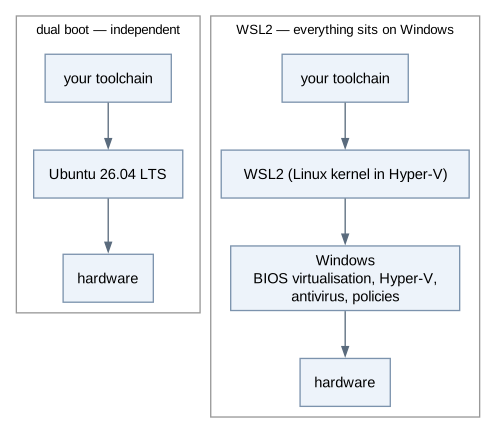
The second reason is what happens when it breaks. On the native partition, Windows and Ubuntu are two independent systems: if one is broken, the other one still boots and you can keep working and hand in. With WSL2 there is only one system, and when it is broken there is no fallback left.
The goal is isolation, not Linux for its own sake: one clean identical partition instead of twenty differently misconfigured Windows installations, so that "works on my machine" stops being a category of error. macOS gives the same isolation and is equally fine. A virtual machine is a stopgap — its disk and memory overhead shows up exactly when Docker does.
Points the answer must contain:
-
It sits on Windows and inherits its misconfiguration
-
When Windows breaks there is no fallback
-
A native partition gives isolation, which is the actual goal
What does idempotent mean, and why is it required here?
covers: lo-3, lo-4
Answer
Idempotent means: running the thing again produces the same end state as running it once. Running it a second time is not an error, and running it after a crash continues rather than breaking what already succeeded.
setup-tools.sh needs this because of arithmetic, not elegance. The first run
takes over fifteen minutes and crosses a dozen independent failure sources — the
network, an apt lock held by an update, a download that aborts, a mirror that
is down, a full disk. Over a whole class, the run will fail somewhere. A script
that could only be run from zero would then require an uninstall step nobody
wrote.
So every step first asks whether the tool is already there:
./setup-tools.sh --check    # what is missing — installs nothing
./setup-tools.sh            # install what is missing, leave the rest alone
The same idea returns twice more in this course, which is why it is worth
learning under its name here: a Dockerfile describes a target state and is
rebuilt to reach it, and Kubernetes takes a desired state and reconciles the
cluster towards it. All three are the same principle — describe the end state,
not the steps.
Points the answer must contain:
-
Running again yields the same end state; an interrupted run can be continued
-
The run is long and has many failure sources, so it will be interrupted
-
Every step checks first whether the tool is present
-
The same idea returns with Docker and Kubernetes
Why are tool installation and identity setup separate scripts?
covers: lo-3
Answer
Because they are two different kinds of thing.
| Script | What it is |
|---|---|
|
a machine state — installs the toolchain, unattended, repeatable any number of times |
|
a person — name, e-mail, SSH key, GitHub login; once, interactive |
A machine state can be reached again; an identity cannot be "installed twice". Mixed into one script you get the worst of both: it asks questions in the middle of a fifteen-minute unattended run, and because of those questions nobody dares to run it a second time — which destroys exactly the idempotence the tool half depends on.
The separation also keeps the boundary around credentials clean. No credential belongs in a repository; the private SSH key is generated on the machine and never leaves it. Only the public key is uploaded to GitHub.
Points the answer must contain:
-
Tool installation is a machine state — repeatable
-
Identity belongs to a person — not repeatable, interactive
-
Mixed, the script cannot be run twice; and no credentials belong in a repository
Your setup run aborted halfway. What do you do?
covers: lo-4
Answer
Read the error first. Almost all of them fall into three groups: the network
was gone, apt was locked by a background update (Could not get lock
/var/lib/dpkg/lock-frontend), or the disk is full. Each has an obvious remedy,
and none of them is "start over".
Then look at what is missing and run the script again:
./setup-tools.sh --check    # what is still missing
./setup-tools.sh            # continues; installed tools are left alone
It continues instead of restarting, because that is what idempotent means — the steps that succeeded are detected and skipped.
Note what the run does not do: stop at the first failure. A failed step is
recorded and the rest continues, so one broken download does not cost you the
other eleven tools. What stayed open is listed under == Bilanz at the end, and
the exit code is non-zero — read that list rather than scrolling back through
fifteen minutes of output.
Two things not to do. Do not reinstall the system: an aborted script run is not a
broken system. And do not put sudo in front of the whole script — it asks for
elevation exactly where it needs it, and running the lot as root leaves
root-owned files in your home directory, which is a second, worse problem to
debug.
Points the answer must contain:
-
Run it again — it continues rather than restarting
-
--checkshows what is still missing -
The run does not stop at the first failure;
== Bilanzlists what stayed open -
Look at the actual error first: network, apt lock, missing disk space