Learning outcomes
Why one environment for everyone
The gain is not didactic, it is isolation. One clean, identical partition instead of twenty differently misconfigured Windows installations. "Works on my machine" stops being a category of error, because the machine is the same one.
| Option | Verdict |
|---|---|
Ubuntu 26.04 LTS as a second partition |
yes — a real system, independent of the Windows state |
macOS |
yes — same tools, same package manager story via Homebrew |
WSL2 |
no — it sits on top of Windows and inherits its misconfiguration: BIOS virtualisation, Hyper-V features, antivirus. When Windows breaks, there is no fallback left |
Virtual machine |
only as a stopgap — the disk and memory overhead shows up exactly when Docker does |
Before you touch the disk
|
Partitioning rewrites the disk layout. Every item below costs minutes now and hours if skipped. |
-
BitLocker recovery key — save it somewhere that is not the machine. Changing the boot configuration can trigger a recovery prompt.
-
Free space ≥ 100 GB. Docker images and JDKs are not small.
-
RAM ≥ 8 GB, 16 GB recommended.
-
Virtualisation enabled in the BIOS (Intel VT-x / AMD-V). Without it, no containers and no minikube.
-
Windows fast startup off. It leaves the Windows partition in a hibernated state that Linux cannot mount safely.
-
SATA mode AHCI, not Intel RST — otherwise the installer sees no disk.
-
Secure Boot — either off, or use signed drivers.
The order that avoids the afternoon of repair
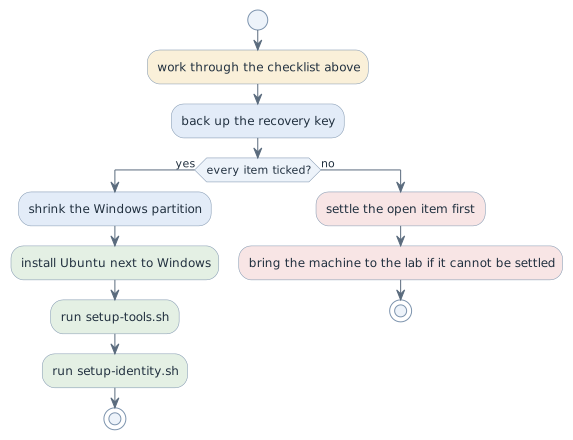
The checklist is the gate, and it is worth its fifteen minutes: every item on it can still be settled cheaply before the partition table changes and becomes expensive afterwards. The recovery key comes first because it is the only one that cannot be produced later.
The class setup
Two scripts in the repository klassen-setup, with different jobs:
| Script | Job |
|---|---|
|
installs the toolchain — repeatable, unattended, any number of times |
|
name, e-mail, SSH key, GitHub login — once, interactive |
They are separate on purpose. Tool installation is a machine state and must be repeatable; identity belongs to a person and cannot be. Mixed together you get a script nobody dares to run twice.
Idempotent means: running it again produces the same end state, and running it
after a crash continues instead of breaking things. The first run takes over
fifteen minutes across a dozen failure sources — network, apt lock, aborted
download — so it will fail at some point. Every step therefore checks first
whether the tool is already there.
A single failure does not end the run. The step is recorded, the remaining ones
continue, and the closing == Bilanz lists what stayed open; the exit code is
then non-zero, because otherwise "it ran through" would say nothing.
git clone https://github.com/htl-leonding-college/klassen-setup.git
cd klassen-setup
less setup-tools.sh      # read it first — this is the point
./setup-tools.sh --check # what is missing, without installing
./setup-tools.sh
./setup-identity.sh
Note what the instructions do not say: curl … | bash. Running a foreign
script unread with elevated rights is the one habit this subject will not teach
you. The detour is the lesson.
What gets installed, and why through SDKMAN
| Tool | How |
|---|---|
git, curl, unzip, zsh, gh |
|
JDK, Maven, Gradle |
SDKMAN — one mechanism on both systems, versions pinned, |
Docker and compose |
|
kubectl, minikube |
release binary matching system and architecture |
asciidoctor |
not installed at all — it runs in a container, so Docker is enough |
The hand-set JAVA_HOME was the single most common failure of the previous
instructions. SDKMAN removes it as a category.
versions.env holds the pinned versions — one place, one truth. Each school
year gets a git tag, so a past state can be reconstructed when a bug turns out
to be a version difference.
Decisions
-
Ubuntu 26.04 LTS as a dual-boot partition (≥ 100 GB) or macOS. No WSL2.
-
The checklist is worked through before any partition change.
-
The toolchain comes from
klassen-setup, not from personal preference. Adding a tool means adding it there, for everyone. -
No credentials in a repository. The private SSH key never leaves the machine.
Pitfalls
-
Starting the installer with items on the checklist still open. Every one of them is minutes now and an afternoon afterwards.
-
Skipping the recovery key. A BitLocker prompt after a boot change without the key means the Windows installation is gone.
-
Running
setup-tools.shwithsudoin front. It asks for elevation where it needs it; running the whole script as root leaves files owned by root in your home directory. -
Assuming a failed run has to be restarted from zero. It does not — that is the point of idempotence.
-
Installing asciidoctor locally "to be safe". Then your output differs from the pipeline’s, which is exactly the problem the container avoids.
Terminology
| Deutsch | English |
|---|---|
Partition |
partition |
Wiederherstellungsschlüssel |
recovery key |
idempotent (wiederholbar mit gleichem Endzustand) |
idempotent |
Werkzeugkette |
toolchain |
Virtualisierung |
virtualisation |
Further reading
-
Repository
htl-leonding-college/klassen-setup— the scripts and the README -
Ubuntu installation guide, https://ubuntu.com/tutorials
-
Module
docker-basics— where the word "image" appears again, and whysetup-tools.shis a first draft of aDockerfile