Learning outcomes
What a pull request is
A pull request is a request to merge a branch, plus a place to discuss it before that happens. Technically it adds nothing to git — you could merge locally. What it adds is a moment where somebody else looks.
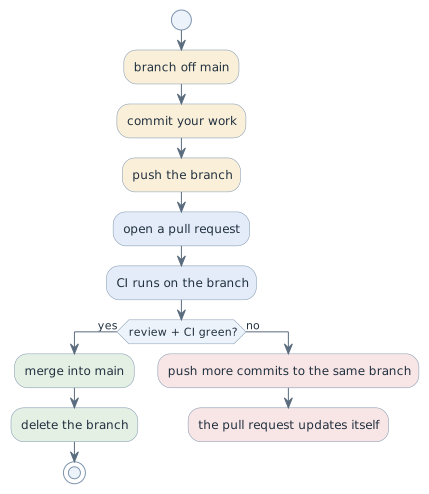
git switch -c feature/attendance-export
# ... commits ...
git push -u origin feature/attendance-export
gh pr create --fill          # or open it in the web interface
gh pr view --web
Branch or fork: who is allowed to push?
A pull request always says the same thing: "please merge branch X of repository A into branch Y of repository B". Whether A and B are the same repository depends on one question — do you have write access?
| Situation | What you need |
|---|---|
Your team’s project repository, you are a collaborator |
a branch in that repository; you can push, so nothing else is required |
Somebody else’s repository — the exercise repositories of this course, an open-source project, another team’s repo |
a fork: your own copy under your account, because you cannot push to theirs |
A fork is a copy of the repository on GitHub, under your own account, with a link back to the original. You have write access to your copy and none to the original — and that is exactly what makes the pull request necessary: it is the mechanism by which somebody without write access can still propose a change.
GitHub shows the link back right under the name of the fork:

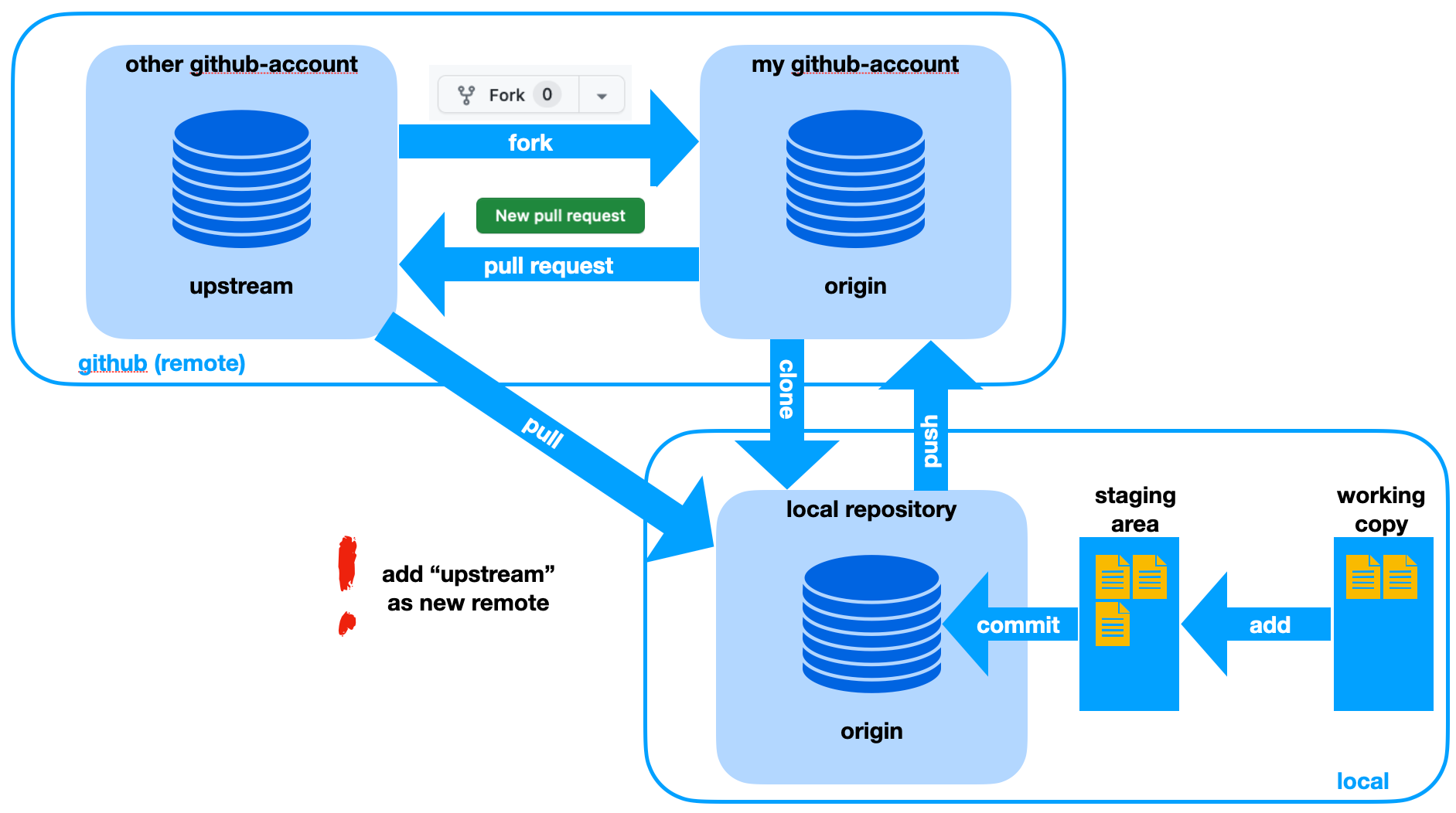
Read the picture from the top left. The fork (Abspaltung) copies the original
into your account, once, on GitHub. You clone your fork, work locally as usual
and push back to it. The pull request goes from your fork to the original.
To pick up what others changed in the original, you pull from upstream —
which only works after you have added it as a second remote.
gh repo fork htl-leonding-example/jg03-syp-git-basics --clone   # fork + clone
cd jg03-syp-git-basics

# after a fork made in the web interface instead:
git clone git@github.com:<you>/jg03-syp-git-basics.git
cd jg03-syp-git-basics
git remote add upstream git@github.com:htl-leonding-example/jg03-syp-git-basics.git

git remote -v          # origin = your fork, upstream = the original
git switch -c feature/exercise-3
# ... commits ...
git push -u origin feature/exercise-3
gh pr create --repo htl-leonding-example/jg03-syp-git-basics --fill
Two remotes, two jobs: origin is your fork — you push there. upstream is
the original — you only ever read from it.
Keeping the fork in sync
A fork does not update itself. After a week your main is behind the original,
and every branch you start from it carries that gap into the pull request.
git fetch upstream
git switch main
git merge upstream/main      # or, in one step:  gh repo sync
git push                     # your fork's main is level again
git switch -c feature/next   # start the next branch from here
Do this before you start a branch, not after the conflict.
| In your own team project you are a collaborator, so a branch is enough and a fork would only add a second copy to keep in step. Fork when you cannot push — which in this course means the exercise repositories, and later every open-source contribution you make. |
Fork or template repository?
A template repository (Vorlagen-Repository) looks similar at first: you press a
button and get your own repository with the same directories, files and,
optionally, branches. The difference is what stays behind — nothing. The new
repository has no link to the template, no upstream, and its history starts
with a single fresh commit.
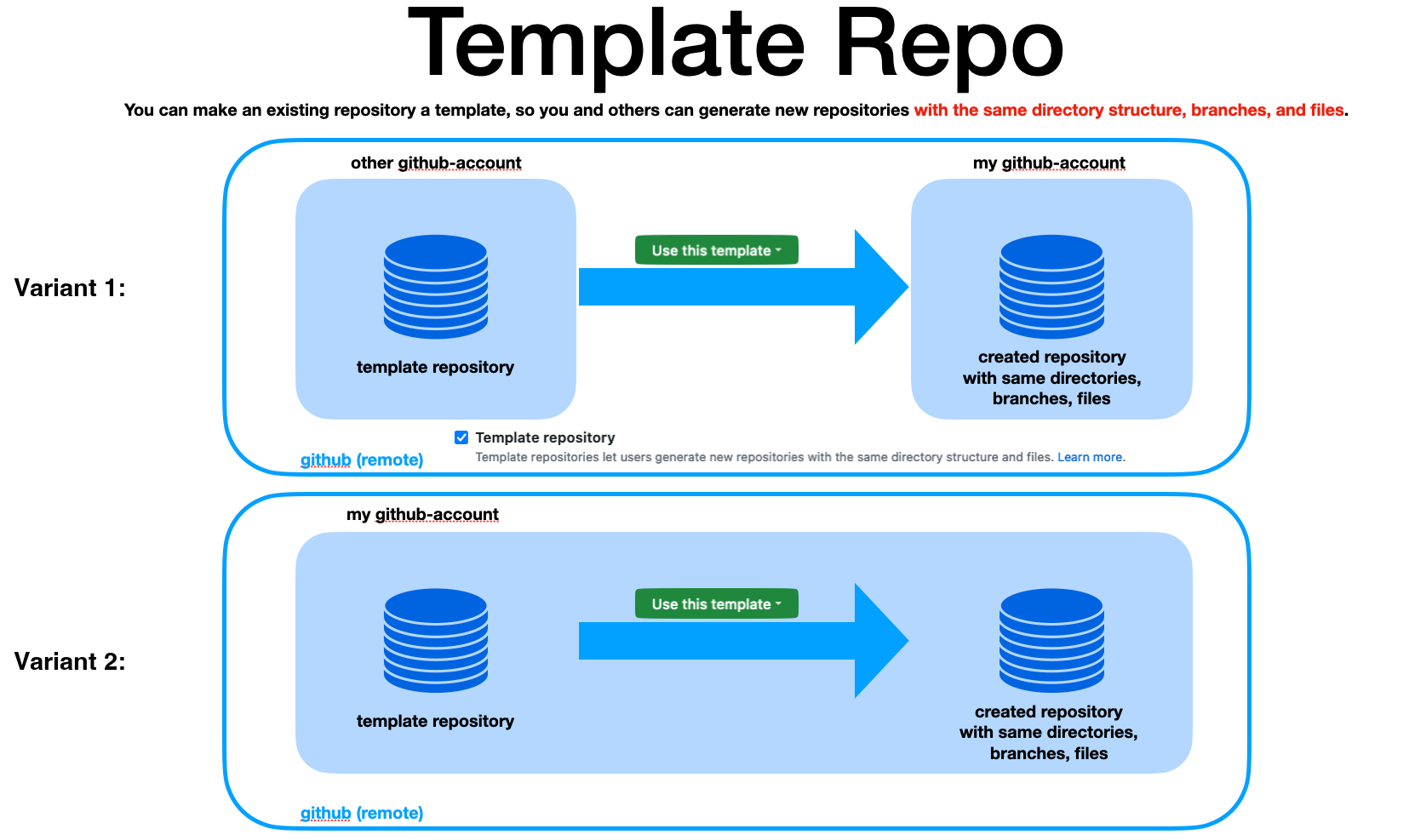
Any repository becomes a template with one checkbox in Settings. After that, Use this template creates the copy — from somebody else’s account into yours (variant 1), or inside your own account (variant 2):
gh repo create my-project --template htl-leonding-college/asciidoctor-convert-template --private --clone| Fork | Template | |
|---|---|---|
link to the original |
yes, |
none |
history |
the complete history of the original |
starts with one new commit |
pull request back to the original |
possible |
not possible |
typical use |
propose a change to somebody else’s project |
start a new project from a prepared skeleton |
Rule of thumb: fork when your work should flow back into the original; template when the original is only a starting point. GitHub Classroom uses templates for exactly that reason — every student gets a repository with the assignment in it, and nobody is meant to send their solution back.
Writing a pull request others can review
The description answers three questions, in this order:
-
What does this change, for the user of the system?
-
Why this way? — the alternative you rejected, in one sentence
-
How did you check it? — the test, the command, the screenshot
A pull request that says "fixes stuff" forces the reviewer to reconstruct all three. A description of five lines saves twenty minutes of someone else’s time.
Keep it small. A pull request of fifty lines gets a real review; one of two thousand gets "looks good to me", which is not a review, it is a signature.
Reviewing
| Useless comment | Useful comment |
|---|---|
"This is wrong." |
"If |
"I don’t like this name." |
"`data` here is a list of bookings; |
"LGTM" after ten seconds |
"Checked the CSV export against the sample file; the date column is off by a day in the DST week." |
Review the change, not the person. Say what you checked, so the author knows what was not checked. And approve only what you actually understood — an approval is a statement about your reading, not about your trust in the author.
Decisions
-
Everything reaches
mainthrough a pull request, including documentation. -
Exercise repositories are forked; the project repository is not — there everybody is a collaborator and works on branches.
-
At least one review from another team member before merging.
-
CI must be green before merging. A red build is not merged "and fixed later".
-
Pull requests stay small enough to read in one sitting.
Pitfalls
-
Approving without reading. The review then certifies nothing, and everyone behaves as if it had.
-
A pull request that mixes a rename with a behaviour change. The diff hides the behaviour change inside three hundred renamed lines.
-
Answering review comments by force-pushing a rewritten branch. The reviewer loses the thread of what changed since their comment.
-
Leaving pull requests open for a week. The branch drifts from
mainand the merge becomes a conflict exercise. -
Working on
mainof your own fork. It is your copy, so nothing stops you — and then the pull request contains every commit you ever made and cannot be synced with the original any more. -
Forgetting the
upstreamremote. The fork then never catches up, and the pull request arrives with commits the original already has. -
Opening the pull request against your own fork’s
maininstead of the original. GitHub preselects the original, but not after you have changed the base once.
Terminology
| Deutsch | English |
|---|---|
Zusammenführungsantrag |
pull request |
Begutachtung, Durchsicht |
review |
Freigabe |
approval |
Rückmeldung |
feedback |
Änderungsumfang |
scope of the change |
Abspaltung, eigene Kopie |
fork |
Gegenstelle |
remote |
ursprüngliches Repository |
upstream |
Vorlagen-Repository |
template repository |
Further reading
-
GitHub docs — About pull requests, https://docs.github.com/pull-requests
-
GitHub docs — Working with forks, https://docs.github.com/pull-requests/collaborating-with-pull-requests/working-with-forks
-
Module
git-conflicts-remotes— what happens when two branches touch the same lines