Learning outcomes
Local, remote, and the copy in between
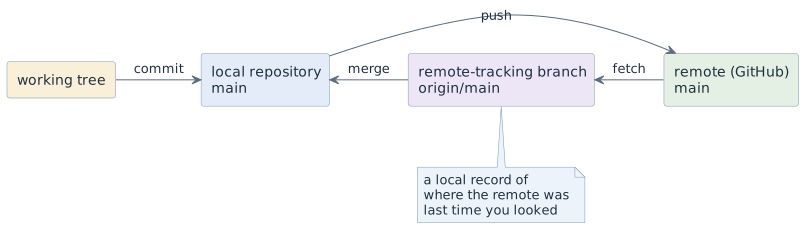
origin/main is not the remote. It is your local note of where the remote’s
main was when you last fetched. git pull is git fetch followed by
git merge — one command doing two things, which is why its failures confuse.
git remote -v            # which remotes exist
git fetch                # update the notes, change nothing else
git status               # ahead / behind / diverged
git pull                 # fetch + merge
git push                 # send your commits
Conflicts
A conflict happens when two branches changed the same lines and git cannot decide which version wins. That is not a failure of git — it is git refusing to guess.
<<<<<<< HEAD
    return members.size() / groups;
=======
    return groups == 0 ? 0 : members.size() / groups;
>>>>>>> feature/guard-empty-groups
Resolving it means: read both sides, decide what the code should do, delete the
markers, and test. Then git add the file and continue the merge.
git merge feature/guard-empty-groups   # conflict reported
git status                             # which files conflict
# edit, remove all <<<<<<< ======= >>>>>>> markers
git add Attendance.java
git commit                             # completes the merge
git merge --abort                      # or: get out and think again
The two rules that prevent most conflicts: short-lived branches, and small
changes. The rule that makes them harmless: resolve them yourself, at the moment
they appear, on your own branch — never in a hurry on main.
Common broken states
| Symptom | What it means and what to do |
|---|---|
|
the remote has commits you do not have — |
|
both sides have new commits — merge them; do not force-push |
You committed to |
|
|
do not, on a shared branch. It deletes other people’s commits |
The same work in IntelliJ
Day to day you will do most of this in IntelliJ, and for conflicts that is the better tool: three panes side by side show more than three marker lines. Every button is still one of the commands above — and in the examination, and when you ask for help, you name the command, not the button.
| Situation | In IntelliJ | Underneath |
|---|---|---|
update the notes |
Git | Fetch, or the fetch icon in the VCS widget |
|
bring the remote’s commits in |
Git | Update Project (Ctrl+T, macOS Cmd+T), strategy Merge |
|
send your commits |
Git | Push (Ctrl+Shift+K, macOS Cmd+Shift+K) |
|
merge a branch into the current one |
branch name in the title bar → the branch → Merge '…' into 'main' |
|
see where things stand |
Commit tool window (Alt+0) and the Log tab of the Git tool window (Alt+9) |
|
The VCS widget in the title bar shows a blue arrow next to the branch when the remote has commits you have not merged, and a green one when you have commits not yet pushed — `git status’s "behind" and "ahead", as icons. Both are only as fresh as the last fetch.
Resolving a conflict
A merge that hits a conflict opens the Files Merged with Conflicts dialog. It
lists the conflicted files — the "Unmerged paths" of git status — and offers
three buttons per file:
| Button | What it does |
|---|---|
Accept Yours |
takes your branch’s version of the whole file and marks it resolved
( |
Accept Theirs |
takes the incoming branch’s version of the whole file
( |
Merge… |
opens the three-pane merge tool — the one to use |
The first two are the "take my side wholesale" pitfall, built in as a single click. Use them only for a file you have read and know one side to be right, such as a generated file.
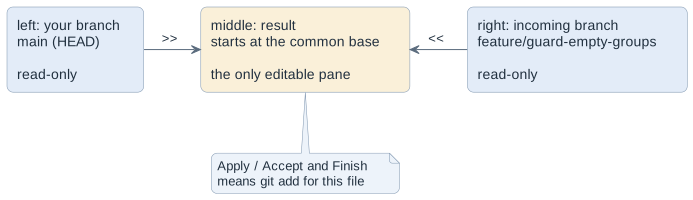
Work through it in this order:
-
Apply Non-Conflicting Changes in the toolbar. It takes over everything git could merge on its own — the changes only one side made. What is still highlighted red afterwards is the real conflict, and usually it is small.
-
Read both sides of each red block.
>>and<<copy one side into the result, the cross discards it. Often the right answer is neither side alone: type the combination into the middle pane. -
Finish the file (Apply, or Accept and Finish). IntelliJ marks it resolved, which is
git add— there are no markers to forget, the result pane never contained any. -
Build and test. The tool proves the file is free of conflicts, not that the code is right.
-
Commit the merge if IntelliJ has not done it yet: the Commit tool window then holds the merge with a prefilled
Merge branch …message. The Log tab shows afterwards whether the merge commit exists — check it there, not by memory.
Closing the dialog does not end the merge. The conflicts stay, as a Merge
Conflicts node in the Commit tool window, until you resolve them or choose
Abort Merge — which is git merge --abort. A conflict produced on the command
line shows up in the same node, so you can start in the terminal and resolve in
the IDE.
A rejected push
When the remote has commits you do not have, Git | Push ends in the Push
Rejected dialog with two choices, Merge and Rebase. In this course choose
Merge: it is git pull followed by git push, the same repair as on the
command line, and a conflict on the way opens the dialog above.
The push dialog can also force a push. The rule does not change because the command is behind a drop-down: not on a shared branch.
Decisions
-
Nobody force-pushes a shared branch. If a history really must be rewritten, the team does it together, on purpose, once.
-
Conflicts are resolved on the feature branch, before the pull request is merged.
-
git pullbefore you start working, and before you push. -
A resolved conflict is only resolved once the build passes — the markers being gone proves nothing.
-
Conflicts may be resolved in IntelliJ’s merge tool, and usually should be. You still have to be able to say which git commands it ran.
Pitfalls
-
Resolving a conflict by taking "your" side wholesale. Half the time the other side contained the fix.
-
Leaving a stray
=======in the file. It compiles in some languages, which is worse than a syntax error. -
Believing
git fetchchanged your files. It updates the remote-tracking branch only — that is what makes it the safe command. -
Pulling with uncommitted changes and then being unable to explain the state. Commit or stash first.
-
Clicking Accept Yours in IntelliJ’s conflict dialog because it is the first button. It throws away the other side of the whole file, including the parts git could have merged on its own.
-
Closing IntelliJ’s conflict dialog and assuming the merge is over. It is still in progress until every file is resolved and the merge is committed — or aborted.
Terminology
| Deutsch | English |
|---|---|
Konflikt |
conflict |
Gegenstelle, entferntes Repository |
remote |
holen / zusammenführen / senden |
fetch / merge / push |
auseinandergelaufen |
diverged |
Konfliktmarkierung |
conflict marker |
Zusammenführungswerkzeug |
merge tool |
Further reading
-
Pro Git, chapter 3.5 — Remote branches, https://git-scm.com/book
-
IntelliJ IDEA documentation — Resolve Git conflicts, https://www.jetbrains.com/help/idea/resolving-conflicts.html
-
Module
git-basics— the Git tool window and its log -
Module
gh-actions-pages— where a green build becomes the condition for a merge