What is a branch technically, and why is creating one cheap?
covers: lo-2
Answer
A branch is a file containing one commit hash. Nothing more. It sits in
.git/refs/heads/, and you can read it:
$ cat .git/refs/heads/main
3f2a9c1e7b0d4a58c1f9e2b6d8a30c4517ee9b21
The commits themselves form a graph: every commit names its parent, so from one
hash the whole history can be walked backwards. A branch is only the label that
says "this end of the graph is called main`", and `HEAD is the label that says
"and this is the one I am working on".
That is why creating a branch is cheap — git writes forty-one bytes and is done. Nothing is copied, no files are duplicated, the operation is instant even in a repository with a hundred thousand commits. Compare this with older systems in which a branch really was a copy of the directory tree: there, branching was an event you asked permission for. In git it is not an event, and that changes how you work — a branch per idea becomes practical, and throwing one away costs nothing.
Committing moves the label forward: the new commit points at the old one, and the branch file is rewritten to the new hash.
Points the answer must contain:
-
A movable pointer to a commit, not a copy of the files
-
The commits form a graph; the branch is one hash in a file
-
Therefore branching costs nothing, and short-lived branches are practical
When do you get a fast-forward and when a merge commit?
covers: lo-3
Answer
It depends on one question only: has the target branch moved since the branch started?
Case 1 — main has not moved. Every commit on main is already an ancestor
of your branch. There is nothing to reconcile: git only has to move the main
label forward along the existing chain. That is a fast-forward — no new
commit is created.

main has not moved, so the label just advancesCase 2 — main has moved too. Somebody merged another branch while you were
working. Now two lines of development start from the same commit and both have
new work. Git cannot advance a label along a straight chain any more, so it
creates a merge commit: a commit with two parents, one on each line.
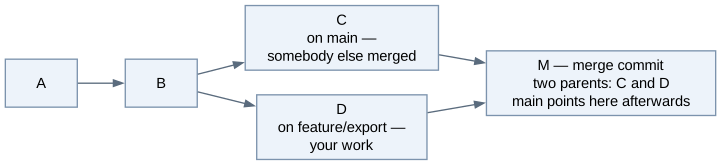
The merge commit is not noise. It is the only place where the history records when two lines came together and how the reconciliation turned out — that is exactly what you want to read six months later when a bug appears. Conflicts, by the way, are a separate matter: they are possible in case 2, they never happen in case 1, but a merge commit is created whether or not there was a conflict.
The whole rule in one line: fast-forward when your branch already contains
everything main has; merge commit when both sides have something the other
does not.
Points the answer must contain:
-
Fast-forward when the target branch has not moved — the pointer advances
-
Merge commit when both lines have new commits; it has two parents
-
The merge commit records how two lines were reconciled
Show the commands for creating, merging and deleting a branch
covers: lo-1
Answer
git switch -c feature/export    # create the branch and switch to it
# ... edit, git add, git commit ...
git switch main                 # back to the target branch
git merge feature/export        # bring the work in
git branch -d feature/export    # remove the label
Three things are worth knowing about this sequence.
switch -c is create and switch in one step; without -c git expects the
branch to exist already. Switching rewrites your working tree, so uncommitted
changes must be committed or stashed first — git refuses the switch if it would
overwrite them.
git merge is run from the branch that receives the work. Beginners regularly
run it the other way round and then wonder why main is unchanged: they merged
main into their feature branch instead.
git branch -d deletes the label, not the commits. They were merged into main
and are reachable from there, so nothing is lost. The lower-case -d refuses to
delete a branch whose commits are not merged anywhere — that refusal is a safety
net, and -D overrides it.
Points the answer must contain:
-
git switch -c feature/x, work, commit -
git switch main,git merge feature/x -
git branch -d feature/x— the label goes, the commits remain
Which branching rules apply in this course, and why each?
covers: lo-4
Answer
Each rule exists because of a specific failure it prevents.
Never commit to main directly. Everything is reviewed. A commit that lands
on main unseen is a change nobody agreed to, and the next person’s merge has
to reconcile it blindly.
Short-lived branches — days, not months. Conflicts do not appear evenly over time; they accumulate silently and arrive all at once on merge day, which is always the day before the deadline. A branch that lives two days has almost no conflict surface.
One branch, one purpose, named after the work: feature/attendance-export,
not felix-work. The name has to tell a reviewer what to expect.
No rebase of published branches. Rebasing writes new commits and abandons the old ones. If somebody else already has the old ones, their repository and yours now disagree about history, and their next push either fails or destroys your version. This is the one git operation that can actually lose other people’s work.
main always builds. A broken main blocks the whole team, not just its
author, so repairing it is the first task of the next morning.
No git-flow. Its develop, release/ and hotfix/ layers solve the
problem of coordinating versioned releases across several teams. A school
project has one team and no released versions, so the ceremony would be learned
as a ritual instead of as a tool.
Points the answer must contain:
-
Never commit to
maindirectly — everything gets reviewed -
Short-lived branches — conflicts accumulate otherwise
-
No rebase of published branches — it destroys other people’s history
-
mainalways builds -
No git-flow: it solves a release-coordination problem a school project does not have
You deleted a branch by mistake. Is the work gone?
covers: lo-2, lo-4
Answer
No. You deleted a label, and the commits it pointed at are still in the object
database. They are merely unreachable — no branch names them any more, so
git log and git branch no longer show them.
What still knows about them is the reflog: git records every movement of HEAD
and of every branch, so the lost hash is written down there.
$ git reflog
3f2a9c1 HEAD@{0}: checkout: moving from feature/export to main
9b41d0e HEAD@{1}: commit: feat(export): write the attendance CSV
...
$ git switch -c feature/export 9b41d0e
The new branch points at the old commit, and the work is back exactly as it was.
Two limits are worth knowing. The reflog is local — it is not pushed and not
cloned, so it only helps on the machine where the work happened. And unreachable
objects are eventually removed by git gc, typically after about thirty days.
Within the run of a school project you have plenty of time; on someone else’s
laptop you have none.
This is also why git branch -d is safe by design: it refuses to delete an
unmerged branch, and only -D overrides that refusal.
Points the answer must contain:
-
No — the commits still exist, only the pointer was removed
-
git reflogfinds the hash,git switch -c name <hash>restores it
What is a detached HEAD, how do you get into one, and why is committing there dangerous?
covers: lo-5
Answer
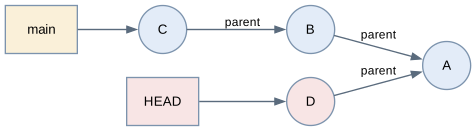
Normally HEAD points at a branch, and the branch points at a commit. That
indirection is what makes a commit move the branch forward with you. Checking out
a commit by its id — git checkout 3fb9399 — removes the indirection: HEAD now
points straight at a commit and no branch is involved. Git says so in plain
words: "You are in 'detached HEAD' state."
As long as you only look, the state is useful and harmless: the working tree
holds the project as it was, you can run it and read it, and git switch - takes
you back. git log shows only the history behind that commit; git log --all
still shows everything.
The danger begins with a commit. The new commit D attaches to the commit you were
standing on, and no branch points at it — HEAD is the only thing holding on.
Switch back to main and HEAD moves away with you. From that moment nothing
names D: it is unreachable, invisible in git log, and git’s garbage collection
will eventually remove it. The work looks lost, and after a few weeks it really
is.
The rescue is to give the commit a name, because that is all a branch is:
# while still detached — the easy way
git switch -c experiment/idea      # the branch now points at D, HEAD re-attaches

# after switching away — via the reflog, which records every HEAD position
git reflog
git switch -c experiment/idea <hash-of-D>
The habit that removes the whole trap: create a branch the moment you intend to change something, and treat a detached HEAD as read-only. Looking at an old state and working from an old state are two different intentions, and only the second one needs a name.
Points the answer must contain:
-
Normally
HEADpoints at a branch, which points at a commit; detached meansHEADpoints at a commit directly -
You get there with
git checkout <commit-id> -
Harmless while reading;
git switch -returns -
A commit made there has no branch pointing at it — after switching away it is unreachable and eventually collected
-
Rescue:
git switch -c <name>before switching away, or afterwards viagit reflog