Learning outcomes
A branch is a pointer
A branch is not a copy of your files. It is a movable pointer to a commit; the commits themselves form a graph. That is why creating a branch costs nothing — git writes a file containing one hash.
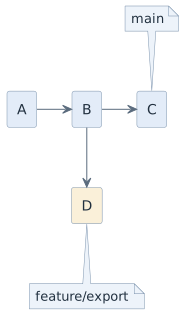
git switch -c feature/export   # create and switch
git switch main                # back
git branch                     # which branches exist, where am I
git merge feature/export       # bring the work into main
git branch -d feature/export   # delete the pointer, the commits stay
HEAD, and what detached means
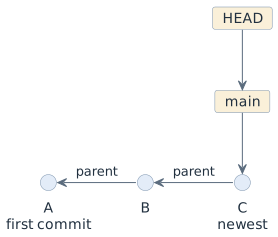
A branch is one pointer; HEAD is the second. HEAD means where you are — the
commit your working tree was built from and the commit your next commit will
attach to. Normally HEAD does not point at a commit directly, it points at a
branch, and the branch points at the commit. That indirection is what lets a
commit move the branch along with you.
Check out a commit by its id, and that indirection is gone. HEAD now points at
a commit, no branch in between. Git calls this a detached HEAD and says so
plainly.
git log --oneline
# 8ade525 (HEAD -> main) chore: remove the unused file2
# 028fc7c docs: extend file1
# 3fb9399 feat: add the first two files

git checkout 3fb9399
# You are in 'detached HEAD' state. …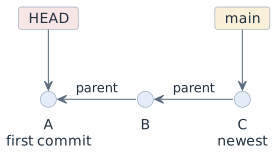
This state is useful and harmless as long as you only look. The working tree
holds the project as it was at commit A, you can run it, read it, and compare it.
Note that git log now shows only A — the later commits are still there, they
are just not reachable from where you stand:
git log --oneline          # A only — the history behind HEAD
git log --oneline --all    # every commit, including C
git switch -                # back to the branch you came from
Why you should not commit here
Commit in a detached HEAD and the new commit attaches to A. No branch points at
it, because HEAD was not pointing at a branch — and HEAD is the only thing
holding on to it.
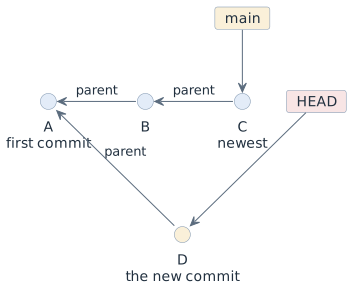
Switch back to main, and HEAD moves away. Nothing points at D any more: the
commit is unreachable. It is still in .git, but no name leads to it, and git
will eventually collect it.
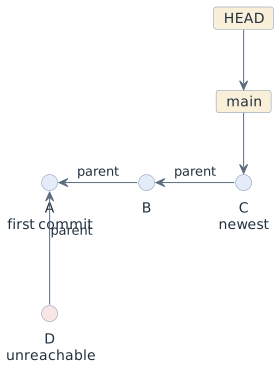
The rescue is to give D a name, which is what a branch is. Do it before you
switch away, or afterwards with the help of git reflog, which records every
position HEAD has had:
# while still detached, the easy way:
git switch -c experiment/idea       # the new branch points at D, HEAD re-attaches

# after the fact:
git reflog                          # find D's hash in the list
git switch -c experiment/idea <hash>| The whole trap disappears if you make it a habit to create a branch the moment you intend to change something, and to treat a detached HEAD as read-only. "Looking at an old state" and "working from an old state" are two different intentions, and only the second one needs a name. |
Two kinds of merge
| Situation | Result |
|---|---|
|
fast-forward — the pointer simply moves forward, no new commit |
|
merge commit — a commit with two parents, recording that two lines of work came together |
The merge commit is not noise. It is the record of when and how two lines of development were reconciled, and it is what makes the history readable later.
The rules in this course
-
Work happens on a branch, never directly on
main. -
One branch, one purpose.
feature/attendance-export, notfelix-work. -
Branches are short-lived — days, not months. A branch that lives for six weeks merges badly, and you find out at the worst moment.
-
mainalways builds. If it does not, fixing it is the first task of the morning. -
No rebase of anything that other people already have. Rewriting shared history is the one operation that destroys other people’s work.
We deliberately do not use git-flow with its develop, release/ and
hotfix/ layers. It solves a problem — coordinating versioned releases across
teams — that a school project does not have, and the ceremony would be learned
as a ritual rather than as a tool.
Decisions
-
Branch from
main, merge back intomain, no long-lived side branches. -
No rebasing of published branches.
-
Branch names describe the work:
feature/…,fix/…,docs/…. -
Delete the branch after merging. The commits survive; only the label goes.
-
A detached HEAD is for reading only. Anything you intend to keep gets a branch first.
Pitfalls
-
Committing to
main"just this once". The next person’s merge then has to reconcile something that was never reviewed. -
Confusing
git switchwith copying files. Switching branches rewrites your working tree — commit or stash before you switch. -
Long-lived branches. The longer they live, the more conflicts they accumulate, and the conflicts arrive all at once.
-
Deleting a branch and believing the work is gone. The commits are still there;
git reflogfinds them. -
Committing in a detached HEAD and then switching branch. The commit is unreachable from that moment on —
git switch -c <name>before switching away costs nothing and keeps it. -
Using
git checkout <commit-id>when the intention was to continue working. Looking at an old state is read-only; working from one needs a branch.
Terminology
| Deutsch | English |
|---|---|
Zweig |
branch |
Zusammenführen |
merge |
Vorspulen |
fast-forward |
Zeiger |
pointer |
kurzlebiger Zweig |
short-lived branch |
abgelöster HEAD |
detached HEAD |
nicht erreichbarer Commit |
unreachable commit |
Verlaufsprotokoll der HEAD-Positionen |
reflog |
Further reading
-
Pro Git, chapter 3 — Branching, https://git-scm.com/book
-
Module
git-pull-requests— how a branch gets reviewed before it is merged