Name the three states of a file in git and the commands that move it
covers: lo-2
Answer
A tracked file is in the working tree (the files as you edit them), in the
staging area (what the next commit will contain), or
in the local repository (.git, the recorded history). Two commands move it
forward, two move it back.

The step people skip in their heads is the staging area. It exists so that you can choose what goes into the next commit instead of committing whatever happens to be on disk — you can stage two of five changed files and commit them as one coherent change.
git status names all three places in plain words: "Changes to be committed"
is the staging area, "Changes not staged for commit" is the working tree, and a clean
tree means both agree with the last commit. Run it far more often than feels
necessary; it is the cheapest way to know where you actually are.
Points the answer must contain:
-
Working tree, staging area, repository
-
git addmoves working tree to staging area,git commitmoves staging area to repository -
git statusshows where everything currently is
What does a commit contain, and why is it a state rather than a diff?
covers: lo-1, lo-2, lo-7
Answer
A commit records the complete state of all tracked files at that moment, plus the author, the timestamp, the message and the hash of its parent commit. It does not store "three lines added in `Booking.java`" — it stores the whole tree as it looked.
The diff you see in git show is computed, on demand, by comparing the commit
with its parent. That is why git diff HEAD~5 works just as easily: any two
commits can be compared, not just neighbouring ones.
Storing states sounds wasteful, and is not: identical file contents are stored once and referenced by every commit that contains them, so a commit that changes one file adds one new object, not a copy of the project.
The consequence matters more than the mechanism. Because every commit is a complete state, you can return to any of them — check one out, see the program as it was, and go back. That is the actual promise of version control, and it is why experimenting is safe: the way back is already recorded. A system that stored only diffs would have to replay them all to reconstruct a state, and a single damaged diff would break the chain.
Points the answer must contain:
-
Complete state of the tracked files, author, timestamp, message, parent
-
The diff is computed between two commits on demand
-
Because it is a state, you can return to it — that is what makes experiments safe
What makes a commit message useful? Give a bad and a good example
covers: lo-3
Answer
A commit message is written for a person reading the history later — usually you, usually while hunting the moment something broke. That reader has the diff already; what they lack is the intent.
The school project guidelines prescribe Conventional Commits:
<type>(<scope>): <subject>

<body: why, not what>

<footer: task id, BREAKING CHANGE>
The subject says what changes for the reader, in the imperative, under about fifty characters, with no full stop.
| Useless | Useful |
|---|---|
|
|
|
|
|
|
The why goes in the body, one blank line under the subject — not into a code comment that nobody will update:
feat(export): write attendance to CSV

The class teachers need the list in the school administration system, which
imports CSV and nothing else. XLSX was rejected because it drags in a library
for one feature.

Task: SYP-42
Two requirements come from the project guidelines rather than from the
specification itself: every message carries the id of its task, so a line of
history and a board entry can be traced to each other, and a breaking change is
marked with ! or a BREAKING CHANGE: footer.
Points the answer must contain:
-
Written for someone reading the history later, imperative, what changes for the reader, under about fifty characters, no full stop
-
Conventional Commits form:
type(scope): subject, for examplefix(booking): reject slots that already startedagainstupdateorfix bug -
The "why" goes in the body, not into a code comment
-
The task id belongs in the message — the project guidelines require it
Name five commit types and say what each is for
covers: lo-3
Answer
| Type | Used for |
|---|---|
|
a new feature — the system can do something it could not do before |
|
a bug fix — the system does what it was always supposed to do |
|
documentation only, no code |
|
restructuring without changed behaviour |
|
tests added or corrected |
|
formatting only |
|
same behaviour, measurably faster |
|
outside source and tests: dependency and version bumps |
|
pipeline and build system |
|
takes an earlier commit back |
The boundary that gets crossed most often is refactor. If behaviour changed,
it is not a refactoring — it is a feat or a fix, and calling it refactor
hides exactly the commit a reviewer would want to look at. The second common
mistake is chore as a dustbin: when the type is genuinely hard to choose, the
problem is usually the commit, not the list of types. A change that is feat
and fix and chore at once should have been three commits.
The point of the type is that it makes the history machine-readable. git log
--oneline | grep feat answers "what did we build in this sprint" without anyone
writing a report, and release notes can be generated from the same information.
Points the answer must contain:
-
featnew feature,fixbug fix,docsdocumentation,refactorrestructuring without changed behaviour,testtests; alsostyle,perf,chore,ci,build,revert -
refactormust not change behaviour — otherwise it isfeatorfix -
The type makes the history machine-readable: what was built, fixed or maintained can be read from
git logwithout asking anyone -
A breaking change is marked with
!or aBREAKING CHANGE:footer
Which files must not be committed, and why does deleting them later not help?
covers: lo-4
Answer
Two categories stay out: everything that can be regenerated, and everything that must not be public.
build/
target/
node_modules/
.venv/
.env            # secrets
*.class
.DS_Store
Deleting them later does not help, because a commit is a permanent record. The
file disappears from the working tree, but the commit that introduced it still
contains it, and anyone with the repository can read it out with git show.
Removing it for real means rewriting history — every hash after the offending
commit changes, every clone has to be reset, and if the repository was public in
the meantime the secret must be treated as leaked anyway. The only remedy that
actually works is rotating the credential.
Generated files cause a smaller but daily problem: source and output are then two truths that drift apart, and every rebuild produces a diff of hundreds of lines that nobody reads. Reviews die of that noise.
So the check happens before the commit — git status and git diff --staged,
not git add . on autopilot.
Points the answer must contain:
-
Regenerable output (
build/,target/,node_modules/) and secrets (.env) -
A committed secret stays in the history; removing it means rewriting history
-
Generated files next to their source create two truths and unreadable diffs
How do you read what changed in a specific commit?
covers: lo-1
Answer
Two steps: find the commit, then read it.
git log --oneline --graph      # find it — one line per commit, branches visible
git show 9b41d0e               # read it — message plus the full diff
git show needs enough of the hash to be unambiguous; seven characters are
normally plenty, and HEAD~2 or a branch name work in the same place.
While you are still working, two other comparisons matter, and mixing them up is the usual source of "but I committed that":
| Command | Compares |
|---|---|
|
working tree against staging area — what you changed but did not stage |
|
staging area against the last commit — what the next commit will contain |
|
a commit against its parent — what that commit changed |
IntelliJ shows the same thing in the Git tool window (Alt+9): the log with its graph on the left, the changed files of the selected commit on the right. Same information, faster to click, and the examination asks you to be able to say what happens underneath.
Points the answer must contain:
-
git log --oneline --graphto find it,git show <hash>to read it -
git diffcompares working tree and staging area,git diff --stagedstaging area and last commit
Where does the network start in the git picture, and what follows from that?
covers: lo-5
Answer
The line runs between the local repository and the remote. Working tree, staging area
and local repository are all on your machine; origin is on the server.

add, commit, log, diff, status, branch and merge are all local.
Committing works on a plane, in a cellar, with the wifi off. Only push,
fetch, pull and clone cross the line.
The remote holds a full history too — a peer copy, not a master version that yours is a fragment of. That is what distributed means: any clone can carry on if the server burns down.
Two things follow that you feel in the first week. A commit that exists only
locally exists for nobody else — "it is committed" and "the others have it" are
different statements, and only a push turns the first into the second. And a
commit on one laptop is not a backup: the machine in room 3 is not a backup of
itself. IntelliJ makes this visible in the Git log: ↗ 6 beside main means
six commits are committed and not pushed.
Points the answer must contain:
-
Working tree, staging area and local repository are on your machine; the remote repository (
origin) is on the server -
add,commit,log,diffare local; onlypush,fetch,pullandclonecross the network -
The remote holds a full history as well — it is a peer copy, not a master version
-
A commit exists for nobody else until it is pushed
What is the difference between a centralized and a distributed VCS, and what does the distributed one make possible?
covers: lo-6
Answer
In a centralized system — Subversion, Team Foundation Server — there is exactly one repository, on one server. Everybody else holds a working copy and nothing more. Every operation that concerns the history goes over the network: committing, reading the log, comparing two versions, reverting.
In a distributed system every clone is a complete repository with the full
history. origin is the copy everybody agreed to meet at; it has no technical
rank over the others.
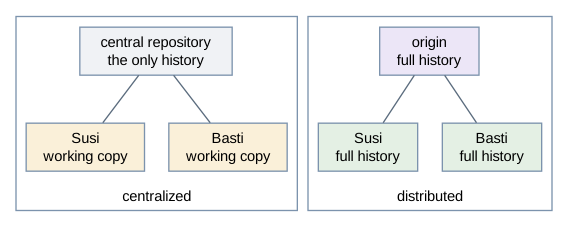
Three things follow, and they are what the question is really after:
-
No single point of failure. If the server is lost, any clone can become the new
origin. In the centralized case the history is gone with the machine unless somebody made a backup of it. -
Work without a network.
git add,git commit,git log,git diff,git switchand merging all happen locally. You can record ten commits on a train and push them in the evening. In a centralized system there is nothing to commit to while offline. -
Cheap branching and experimenting. A branch is a local pointer, so nobody has to be asked and nothing is published until you push. This is what makes the branch-per-change rule of this course practical at all.
The price is the one concept centralized systems do not have: there are now two repositories that can disagree, so you have to know whether a commit is only local or already pushed.
Points the answer must contain:
-
Centralized: one repository on a server, everybody else holds a working copy
-
Distributed: every clone holds the full history,
originis a convention -
No single point of failure, work offline, cheap branches
-
The price: local and remote can diverge — "committed" is not "pushed"
You commit three times, and the third commit deletes a file. What is in the repository afterwards?
covers: lo-7
Answer
Three snapshots. Not "two files plus two changes plus one deletion" — three complete states of the tracked files:
| Commit | Tracked files in that snapshot |
|---|---|
1 |
|
2 |
|
3 |
|
The deletion is not stored as an instruction "remove file2`". Commit 3 is
simply a state in which `file2 does not appear. git show displays it as a
removal because it compares commit 3 with commit 2 — the minus lines are
computed, not recorded.
Two details that are usually asked next:
-
The unchanged
file2is not stored twice. Git stores file contents by their hash, so commit 1 and commit 2 reference the same object. Storing whole states is affordable because identical content is stored once and everything is compressed. -
The deletion had to be staged.
rm file2changes the working tree only; untilgit add file2(orgit rm file2) the deletion is not in the staging area and the commit would still contain the file. A deletion is a change like any other.
And file2 is not lost: it is in the snapshots of commits 1 and 2, and
git restore --source=HEAD~1 file2 brings it back into the working tree.
Points the answer must contain:
-
Three complete snapshots, not a base plus differences
-
Commit 3 is a state without
file2; the removal shown bygit showis computed -
Identical content is stored once, contents are compressed
-
The deletion has to be staged, and the file is still recoverable from the earlier commits