Learning outcomes
The smallest useful pipeline
"My .adoc becomes a website when I push." That is a complete continuous
integration setup: a trigger, a build, an artefact, a deployment.
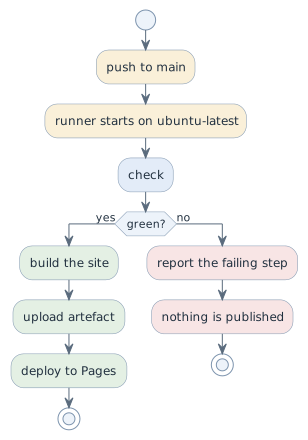
name: docs

on:
  push:
    branches: [main]
  pull_request:

jobs:
  build:
    runs-on: ubuntu-latest
    steps:
      - uses: actions/checkout@v4
      - name: Convert AsciiDoc
        run: ./local-convert.sh
      - uses: actions/upload-pages-artifact@v3
        with:
          path: build/site
Two properties matter more than the syntax. The workflow runs the same script you run locally, so a green pipeline means your local build was honest. And it runs on somebody else’s machine, which is the point of the next section.
The neutral arbiter
In a team with Linux laptops and Macs, "it works on mine" is not evidence. The runner settles it:
| Difference | What it breaks |
|---|---|
macOS file names are case-insensitive by default |
|
Apple Silicon is arm64, most servers are amd64 |
an image built on a Mac may not run on the server |
Different tool versions |
"works for me" with a two-year-old asciidoctor |
ubuntu-latest is the same environment for everyone, so a disagreement between
two laptops has a referee. That is why CI arrives this early in the course: not
as an advanced topic, but as the end of an argument.
Reading a failed run
-
Open the run, find the first red step — later failures are usually consequences.
-
Read the last twenty lines of that step, not the first.
-
Reproduce locally with the same command. If it passes locally and fails on the runner, the difference is the environment: case, architecture, a missing file that is only on your disk because it was never committed.
The most common cause by far is the last one: a file that exists locally and is not in the repository.
Publishing
Pages serves the artefact. In the repository settings the source is "GitHub Actions", and a second job deploys what the build produced. A red build publishes nothing, so the site always shows the last state that passed.
Decisions
-
Every project repository has a workflow that builds the documentation on push and on every pull request.
-
CI runs the same script as the local build. Two different build paths would drift.
-
mainmust stay green. A redmainis fixed before new work starts. -
Deployment happens only from
main, and only from a green build.
Pitfalls
-
Committing generated HTML "so that Pages has something". The pipeline is what generates it.
-
Secrets in the workflow file. Anything in the repository is public here.
-
A pipeline that only runs on
main. Then a pull request cannot be checked before merging, which is the moment it matters most. -
Fixing a red build by disabling the step. The build then reports nothing, which is worse than reporting a failure.
Terminology
| Deutsch | English |
|---|---|
Ablaufplan, Pipeline |
workflow, pipeline |
Auslöser |
trigger |
Bauumgebung |
build environment, runner |
Artefakt |
artefact |
Veröffentlichung |
deployment |
Further reading
-
GitHub Actions documentation, https://docs.github.com/actions
-
Module
docker-multiarch— the architecture half of the same problem