Learning outcomes
One image, several environments
The image built in the previous lesson is immutable and identical everywhere. That is exactly the property that forces data and configuration out of it.
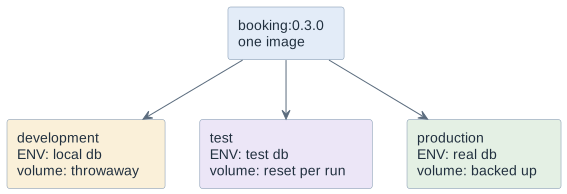
If the database password were inside the image, there would have to be three images, and the one that was tested would not be the one that runs. That is the whole argument, and it is worth being able to state in one sentence: the thing you tested must be the thing you ship, so everything that differs between environments has to come from outside.
Two kinds of thing come from outside, and they behave differently:
-
state (Zustand) — the database files, uploads, anything that must survive the container. This is
volumes. -
configuration — hostnames, ports, feature switches, credentials. This is environment variables (Umgebungsvariablen) and mounted files.
Volumes and bind mounts
A container’s writable layer dies with the container. Anything that must outlive it is mounted in.
| Named volume (benannter Datenbereich) | Bind mount (eingehängter Hostpfad) | |
|---|---|---|
Command |
|
|
Managed by |
Docker, in its own storage area |
you, an ordinary path on the host |
Portable |
yes — same command on any machine |
no — depends on the host path and its permissions |
Use for |
the state of a service: databases, uploads |
source during development, config files, a directory you must inspect |
Backup |
|
ordinary file backup |
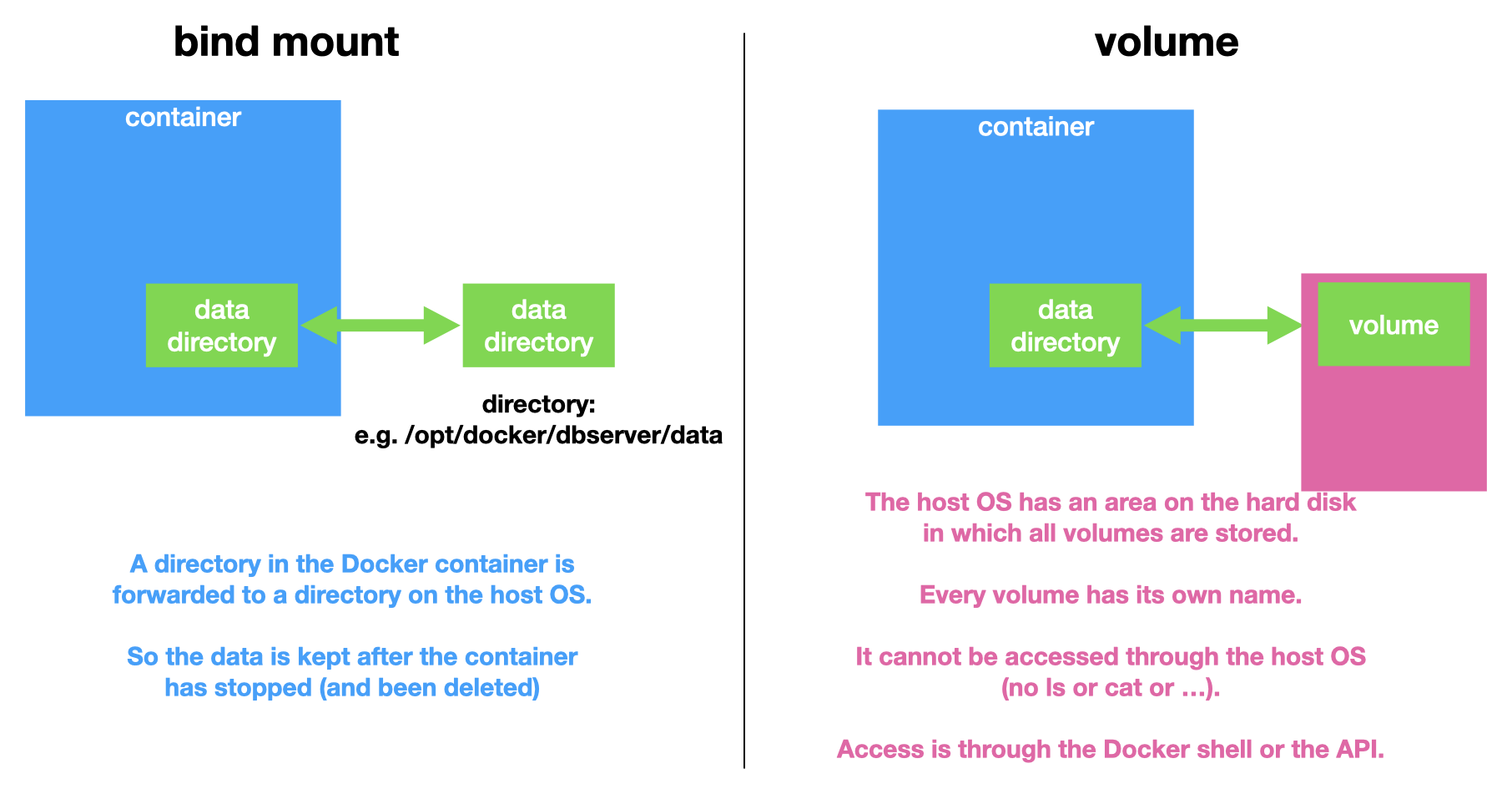
Note the right-hand half of the picture: a named volume lives in a storage area
that Docker manages. On the host you cannot simply ls or cat into it — access
goes through Docker, a container or the API. A bind mount is the opposite: an
ordinary directory you can open with any tool.
Rule of thumb: named volume for state the service owns; bind mount for files a human edits. A database on a bind mount works and then gives you permission and performance problems on the first machine that is not yours — which is the one that matters.
A concrete case is the nginx web server from the first lesson. Its image holds the program and the default pages; the pages the container serves are files in the writable layer, so they vanish with the container — unless the directory is mounted from outside.
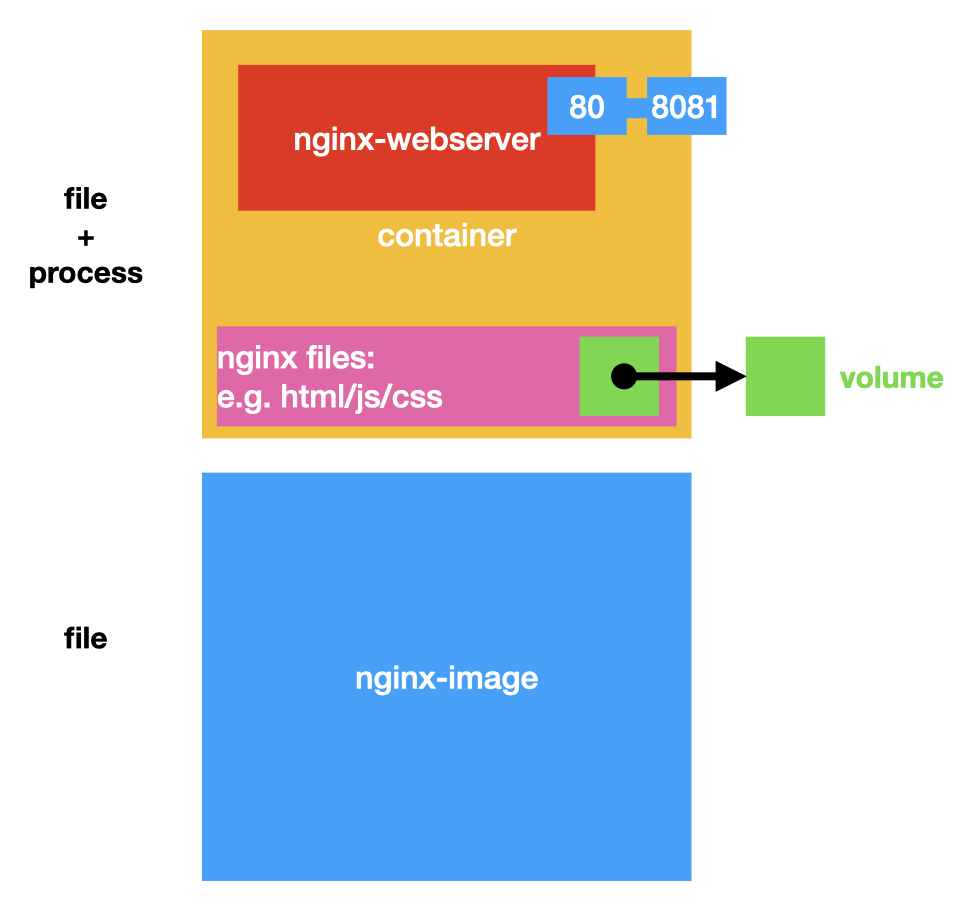
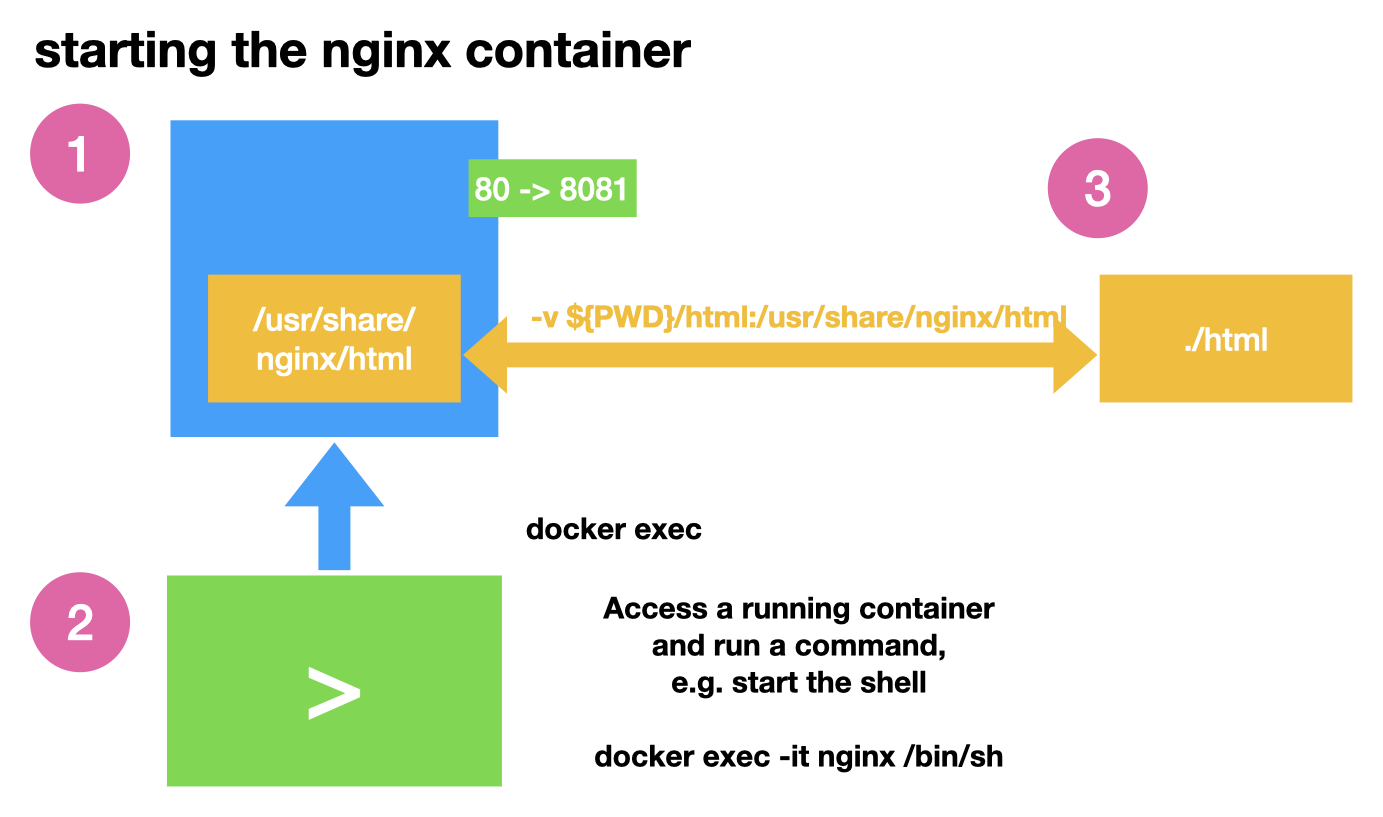
docker run -d --name nginx -p 8081:80 \
  -v "${PWD}/html:/usr/share/nginx/html" nginx:1.27    (1) (2)
docker container exec -it nginx /bin/sh (3)| 1 | -p 8081:80 — port 80 in the container, 8081 on the host |
| 2 | -v …/html:/usr/share/nginx/html — the host directory ./html replaces the
served directory; edit a file on the host and reload the browser |
| 3 | docker container exec runs a command in a running container, here a shell |
docker volume create bookingdata
docker run -d --name db \
  -e POSTGRES_PASSWORD_FILE=/run/secrets/db_password \
  -v bookingdata:/var/lib/postgresql/data \
  postgres:17-alpine

docker volume ls
docker volume inspect bookingdata
docker volume rm bookingdata          # irreversible — the data is gone
docker volume rm and docker volume prune delete data with no
confirmation and no undo. Before either one, know what is in it, and know when it
was last backed up.
|
Configuration at run time
Three ways in, in increasing order of how much they can carry:
# 1 — single values
docker run -e DB_HOST=db -e LOG_LEVEL=info booking:0.3.0

# 2 — many values, from a file that is NOT in the repository
docker run --env-file ./local.env booking:0.3.0

# 3 — whole config files, mounted read-only
docker run -v "$PWD/application.yaml:/app/application.yaml:ro" booking:0.3.0
The application has to be written to accept them, which is a design rule rather than a Docker one: read configuration from the environment, with sensible defaults, and fail loudly when something required is missing. A service that starts with an empty database password and only fails on the first request is harder to debug than one that refuses to start.
The :ro in the third example is worth the four characters. A configuration file
mounted writable can be modified by the container, and then the file on the host
no longer matches what anybody committed.
Secrets
The rule from the previous lesson still holds — nothing secret in the image — and now there are three more places it must not be:
| Not in | Because |
|---|---|
the image |
every layer is readable with |
the repository |
git keeps it after deletion; a public repository publishes it instantly |
the command line |
|
the log |
logs are collected, forwarded and read by people who are not you |
What is left, in order of preference:
-
a secret file mounted read-only and referenced by path — the
*_FILEconvention most images support; -
an environment variable from an
--env-filethat is in.gitignore; -
for the pipeline: the repository secrets of GitHub Actions, injected as environment variables at run time.
A committed .env.example with the names and dummy values is the piece that
makes this workable: the next person knows what to set without anybody ever
sending a password over chat.
| A secret that has been in an image, a commit or a public log is burnt. Rotate it. Deleting the file changes nothing, for the same reason a later layer does not remove an earlier one. |
Backup and restore
A service whose data has never been restored does not have a backup; it has a hope. Restoring is the part that has to be practised, and it takes ten minutes.
# backup: a throwaway container that can see the volume
docker run --rm -v bookingdata:/data -v "$PWD:/backup" alpine:3.24 \
  tar czf /backup/bookingdata-2026-11-14.tar.gz -C /data .

# restore into a fresh volume
docker volume create bookingdata_restored
docker run --rm -v bookingdata_restored:/data -v "$PWD:/backup" alpine:3.24 \
  tar xzf /backup/bookingdata-2026-11-14.tar.gz -C /data
For a database, the better backup is the database’s own dump — pg_dump rather
than a file copy — because a file-level copy of a running database can catch it
mid-write. The tar approach is right for uploads and for volumes whose service is
stopped.
Two habits worth acquiring now: stop the service before a file-level backup, and write the restore command down next to the backup command, because the restore is what you will need under pressure.
Decisions
-
No state and no configuration inside an image. One image serves all environments.
-
Named volumes for service state; bind mounts only for files a human edits.
-
Configuration through environment variables or read-only mounted files. The application fails loudly when a required value is missing.
-
No secret in an image, a repository, a command line or a log.
.envfiles are in.gitignore; a committed.env.exampledocuments the names. -
Every project with persistent data has a written backup and restore command, and the restore has been executed at least once.
-
docker volume rmandpruneare never run on a shared machine without checking what is in the volume.
Pitfalls
-
Baking a configuration or a password into the image and needing one image per environment. The tested image is then not the one that runs.
-
Removing a container with
-vor pruning volumes and deleting a database nobody had backed up. -
A bind mount for a database, then permission errors on the next machine.
-
A secret on the command line, visible in
docker container lsand in the shell history. -
Mounting a config file writable and letting the container edit it out from under the repository.
-
A backup that has never been restored. It is not a backup.
Terminology
| English | Deutsch |
|---|---|
named volume |
Datenträger, benannter Datenbereich |
bind mount |
Einhängen eines Hostpfads |
environment variable |
Umgebungsvariable |
secret |
Geheimnis, Zugangsdatum |
read-only |
nur lesbar |
backup |
Sicherung |
restore |
Wiederherstellung |
state |
Zustand |
Further reading
-
The Docker documentation on volumes, bind mounts and environment variables
-
Module
docker-images— why the secret must not be in a layer either -
Module
compose-basics— the same settings, written down instead of typed