Why might an image built on one machine not run on another?
covers: lo-1
Answer
Because an image contains compiled binaries, and a binary compiled for one instruction set is not executable on another. A container shares the host kernel and runs the host’s processor architecture.
| Machine | Architecture |
|---|---|
school and office PCs, most CI runners |
|
Mac with an M-series chip |
|
Raspberry Pi 4 and 5 |
|
newer cloud instances |
|
This is not an exotic topic — it is why one team’s image runs on three laptops and fails on the fourth. The image built on somebody’s MacBook may not start on the school server, and the pipeline’s image may not start on their MacBook.
Points the answer must contain:
-
Images contain compiled binaries tied to an instruction set
-
amd64andarm64are the two that matter in this class -
A container runs the host architecture, unlike a VM with its own kernel
-
Mixed hardware in one team makes this an everyday problem
How do you recognise an architecture mismatch?
covers: lo-2
Answer
By the error, which does not say "wrong architecture":
exec /app/entrypoint.sh: exec format errorexec format error means the kernel was asked to run a binary it does not
understand — the same error a Linux kernel gives for a Windows executable, for
the same reason. The commonest wrong response is to start rewriting the
entrypoint script.
Inspect instead of guessing:
docker image inspect nginx:1.27 --format '{{.Os}}/{{.Architecture}}'
docker buildx imagetools inspect nginx:1.27
uname -m
On macOS and Windows the picture is muddier: Docker emulates the foreign architecture with QEMU, so the image runs — five to ten times slower, and occasionally with subtle failures in native libraries. "It works but it is inexplicably slow" is a symptom of this, not of the code.
Points the answer must contain:
-
exec format error, and the platform-mismatch warning on a Mac -
It is a binary-format problem, not a broken script
-
docker image inspect/buildx imagetools inspect/uname -m -
Emulation hides it and shows up as unexplained slowness
How do you build and publish a multi-architecture image?
covers: lo-3
Answer
docker buildx create --name multi --use --bootstrap
docker buildx build \
  --platform linux/amd64,linux/arm64 \
  -t ghcr.io/htl-leonding-example/booking:0.3.0 \
  --push .
Two details that trip up the first attempt.
--push, not --load. The local image store holds one architecture, so a
multi-platform build cannot be loaded into it. It goes straight to a registry, or
you build one platform at a time with --load for local testing.
It is slower. Each platform is built separately and the non-native one is emulated, so two platforms cost more than twice one — which is the argument for building them in the pipeline rather than on a laptop.
For a JVM application there is a shortcut: the .jar is architecture-independent,
so only the base image differs, and a multi-architecture base such as
eclipse-temurin:25-jre-alpine gives both variants from the same Dockerfile.
With native code — node-gyp, Python C extensions, Go with cgo — the build
genuinely happens twice.
Points the answer must contain:
-
buildxwith--platformlisting the platforms -
--pushis required;--loadcannot hold two architectures -
Slower than a single build; belongs in the pipeline
-
JVM artefacts are portable, native code is not
What is an image index and how is the right variant chosen?
covers: lo-4
Answer
A tag in a registry does not have to point at one image. It can point at an image index — a manifest list — a small document naming one image per platform.
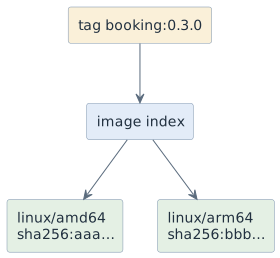
docker pull booking:0.3.0 fetches the index, the client looks up its own
platform and pulls that digest. Nobody has to know which machine they are on,
which is why nginx:1.27 simply works everywhere.
One consequence worth remembering: the index has its own digest and each variant
has another. booking@sha256:aaa… pins one architecture — so pinning by digest,
which is otherwise good practice, silently makes an image single-platform for
everybody who uses it.
Points the answer must contain:
-
A tag may point at an index listing one image per platform
-
The client selects by its own platform automatically
-
Index and variants have separate digests
-
Pinning a variant digest pins the architecture too
When is a multi-architecture build worth its cost?
covers: lo-5
Answer
| Build both | Do not bother |
|---|---|
the team has Intel and Apple Silicon machines |
everything, server included, is
|
it will run on a Pi or an ARM cloud instance |
the image is only used by the pipeline |
other people pull the image |
it is a throwaway build for one experiment |
it is a base image others build on |
the build takes 20 minutes and nobody needs the second variant |
The honest default for a school project: if the team is mixed, build both; if not, build one and write down which. The second half is what gets skipped, and it is the difference between a two-minute diagnosis and a lost afternoon.
Useful in either case: --platform linux/amd64 on docker run forces a
variant. On a Mac that reproduces what the server will do — slowly, under
emulation, but faithfully.
Points the answer must contain:
-
Worth it for mixed teams, ARM targets and images others consume
-
Not worth it for single-architecture environments and throwaway builds
-
Either way, document which platforms the image supports
-
--platformon run forces a variant for reproducing another machine
Why can buildx build --platform amd64,arm64 --load never work?
covers: lo-3, lo-4
Answer
Because --load writes into the local image store, and a local image under a
tag is one image for one architecture. There is nowhere for the second variant to
go: the store has no concept of an index sitting under a local tag.
The multi-platform result is an image index pointing at two images, and that
structure only exists in a registry. Hence --push, which is not a convenience
but the only destination that can represent the result.
The two ways forward, depending on what you actually want:
-
to publish:
--pushto a registry, and the index is created for you; -
to test locally: build one platform at a time with
--platform linux/arm64 --load, which produces an ordinary single image you can run.
The error message on the first attempt is unhelpfully terse, which is why this is worth knowing before you meet it rather than after twenty minutes of retrying.
Points the answer must contain:
-
--loadtargets the local store, which holds one image per tag -
The multi-platform result is an index, which only exists in a registry
-
Use
--pushto publish -
Build a single platform with
--loadfor local testing