Learning outcomes
The description is the source
The previous lesson ended with an edit inside a running container that disappeared. The repair is a file: everything the image contains is written down, committed and rebuilt.
FROM eclipse-temurin:25-jre-alpine          (1)
WORKDIR /app                                 (2)
COPY build/libs/booking.jar app.jar          (3)
EXPOSE 8080                                  (4)
USER 1000:1000                               (5)
ENTRYPOINT ["java", "-jar", "/app/app.jar"] (6)| 1 | the base image, pinned — never latest |
| 2 | the working directory for everything that follows |
| 3 | copy the artefact into the image |
| 4 | documentation of the port; it publishes nothing by itself |
| 5 | do not run as root |
| 6 | the command the container runs when it starts |
docker build -t booking:0.3.0 .
docker run --rm -p 8080:8080 booking:0.3.0
Two instructions are regularly confused. EXPOSE is documentation: it records
which port the program listens on and publishes nothing — that is -p at run
time. And ENTRYPOINT versus CMD: ENTRYPOINT is the program, CMD supplies
default arguments that a docker run can override. If you want the container to
be a program, use ENTRYPOINT; if you want it to be a starting point somebody
adapts, use CMD.
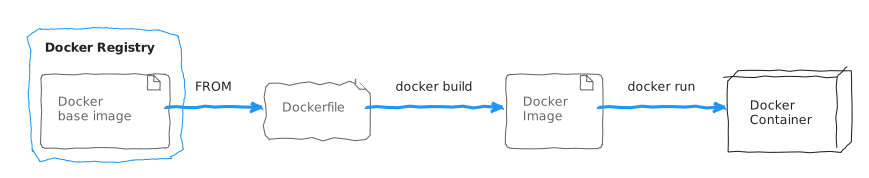
The whole path from description to running container fits in one picture: a
Dockerfile names a base image with FROM, docker build turns it into an
image, and docker run starts a container from that image.
The build context
docker build . does not read your disk freely. It packs the directory you name
— the build context — and sends it to the Docker daemon; COPY can only reach
what is inside it. The .dockerignore file decides what is left out of that
pack.
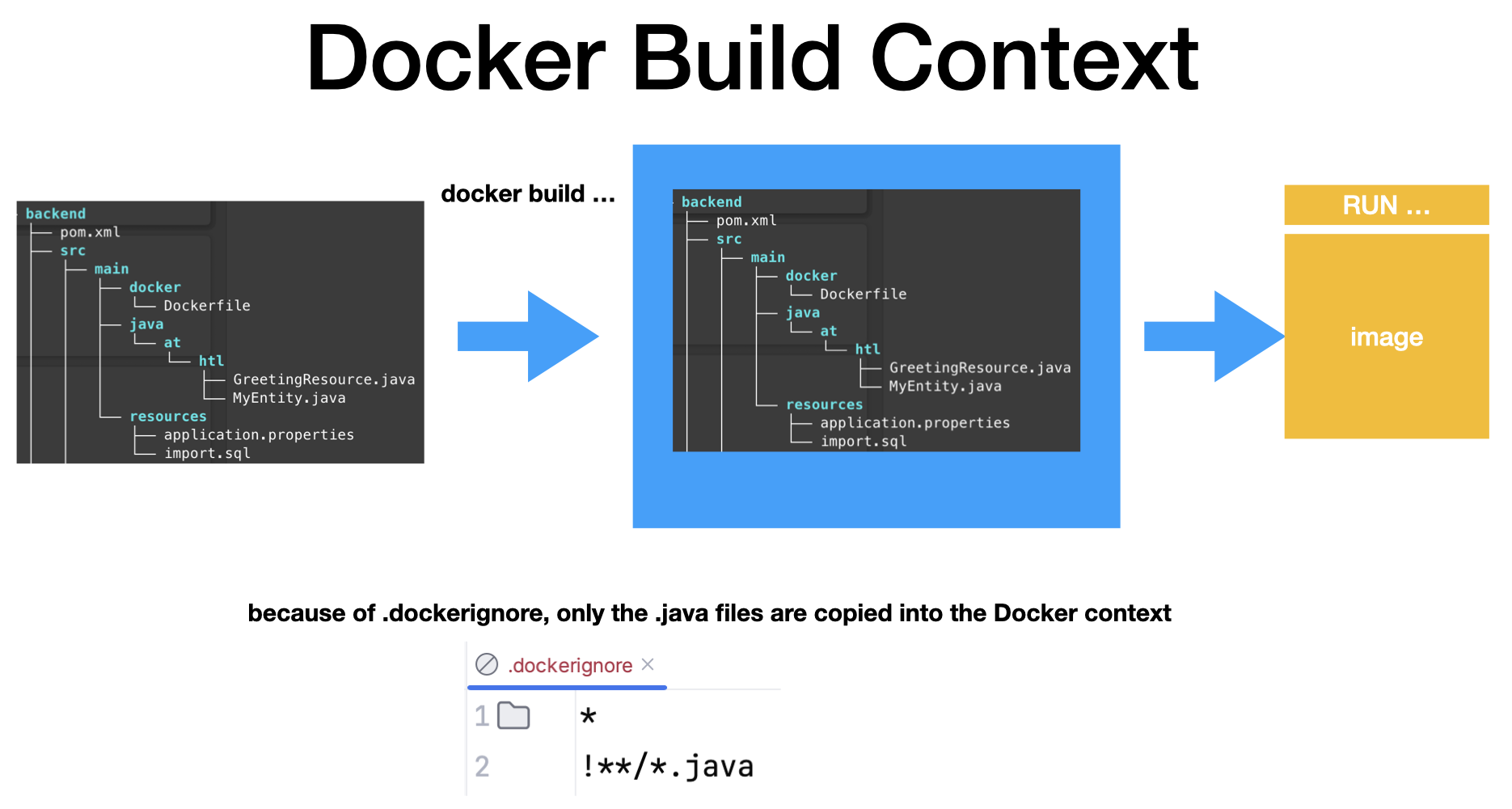
.dockerignore (own)The example in the picture is an allow-list: excludes everything, and
!*/*.java takes the Java sources back in. Fewer files in the context means a
faster build and nothing in the image that does not belong there.
Layers and the cache
Every instruction produces a layer (Schicht). On rebuild, Docker reuses layers whose inputs have not changed, and invalidates everything after the first one that has.
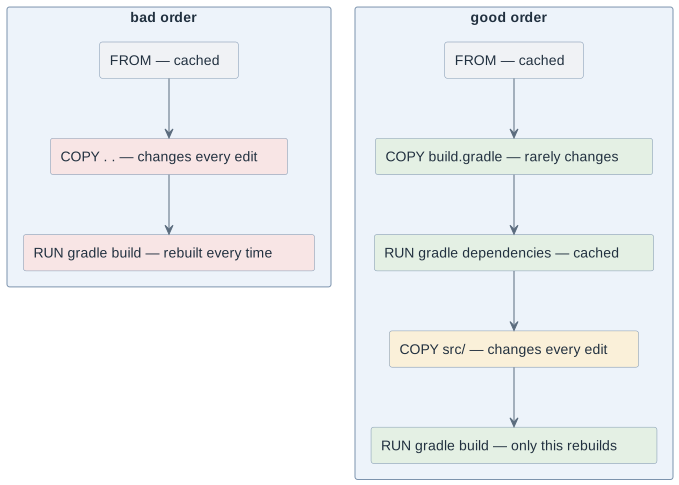
The rule that follows: order instructions from least to most frequently changed. Dependency declarations are copied and resolved before the source is copied, because the sources change on every save and the dependencies change monthly. Ignoring this turns a five-second rebuild into a three-minute one, every time.
A .dockerignore belongs next to the Dockerfile for the same reason, plus a
better one:
.git
build/
.gradle/
node_modules/
*.env
It keeps the build context small — and it keeps .git and .env files out of
the image, which is a correctness and a security matter, not a speed one.
Multi-stage builds
A build needs a compiler, a package manager and a source tree. A running program needs none of them. A multi-stage build (mehrstufiger Bau) separates the two and ships only the second.
FROM gradle:8.10-jdk25 AS build
WORKDIR /src
COPY build.gradle settings.gradle ./
RUN gradle dependencies --no-daemon
COPY src ./src
RUN gradle bootJar --no-daemon

FROM eclipse-temurin:25-jre-alpine
WORKDIR /app
COPY --from=build /src/build/libs/*.jar app.jar
USER 1000:1000
ENTRYPOINT ["java", "-jar", "/app/app.jar"]
What the second stage does not contain: the JDK, Gradle, the dependency cache, the source code and every intermediate file. Typical effect on a Java service — from something near a gigabyte to something near a hundred megabytes.
Size is the visible benefit and the smaller one. The real gains are that the attack surface (Angriffsfläche) shrinks — a compiler and a package manager inside a production image are tools for whoever gets in — and that the source code, which may not be public, is not shipped to everyone who pulls the image.
Rules for an image somebody else runs
| Rule | Why |
|---|---|
Pin the base image, including the tag |
|
Do not run as root |
a container escape is worth much less against an unprivileged user |
No secrets in the image |
every layer is readable with |
Pass configuration at run time |
the same image must be usable in test and in production — see
|
Log to stdout and stderr |
|
Keep the image small |
less to transfer, less to patch, less to attack |
The secrets rule is the one that costs people real damage, because it is counter-intuitive. This is not safe:
COPY secrets.env /app/secrets.env
RUN ./configure.sh && rm /app/secrets.env    # the file is still in the earlier layer
Anybody who pulls the image can read it. A secret that has been in an image is burnt and has to be rotated — the same rule as a secret committed to git, for the same reason.
Tags and publishing
A tag (Kennzeichnung) is a name for an image; a digest (Fingerabdruck) is its identity. Tags can be moved, digests cannot.
docker build -t ghcr.io/htl-leonding-example/booking:0.3.0 .
docker image tag ghcr.io/htl-leonding-example/booking:0.3.0 \
           ghcr.io/htl-leonding-example/booking:latest
docker login ghcr.io
docker push ghcr.io/htl-leonding-example/booking:0.3.0
Conventions worth adopting now, because they cost nothing and are painful to retrofit:
-
A version tag per release, never only
latest.latestis a convenience for humans and a trap for machines. -
The image is built by the pipeline, from a commit, not from somebody’s laptop. Then the image and the source that produced it are connected.
-
The tag names the version, not the moment.
0.3.0means something in six months;monday-fixdoes not.
| A registry is public unless you made it private. An image pushed to a public registry is world-readable, including everything in every layer. |
Decisions
-
Every image is built from a committed
Dockerfile. No images built by hand or from a container that was modified. -
Base images are pinned to an explicit version tag.
-
Every application image uses a multi-stage build and runs as a non-root user.
-
No secrets in images, in any layer. Configuration is passed at run time.
-
Images are tagged with a version;
latestmay exist in addition, never alone. -
Project images are built by the pipeline from a commit, not pushed from a laptop.
Pitfalls
-
Copying the source before the dependency declarations and rebuilding everything on every save.
-
A missing
.dockerignore, so.git,build/and.envend up in the image. -
Believing that
rmin a later layer removes a secret. It does not. -
EXPOSEinstead of-p, then wondering why nothing is reachable. -
ENTRYPOINTandCMDmixed up, so arguments cannot be overridden — or the program cannot be started at all. -
Publishing only
latest, then being unable to say which image is running anywhere.
Terminology
| English | Deutsch |
|---|---|
Dockerfile, image description |
Bauanleitung |
layer |
Schicht |
build cache |
Zwischenspeicher |
multi-stage build |
mehrstufiger Bau |
base image |
Basisabbild |
attack surface |
Angriffsfläche |
digest |
Fingerabdruck |
tag |
Marke, Kennzeichnung |
Further reading
-
The
Dockerfilereference and the "best practices" page of the Docker documentation -
Module
docker-volumes-config— the configuration that must not be baked in -
Module
gh-actions-pages— the pipeline that will build these images