Which problem do containers solve?
covers: lo-1
Answer
"It works on my machine" — the family of failures that come from the environment rather than from the code.
| Symptom | Cause |
|---|---|
builds here, fails in the pipeline |
different tool version, library or locale |
works for three people, not the fourth |
something installed once and forgotten |
worked in November, fails in March |
a system update changed an unpinned dependency |
"just install these six things first" |
the setup lives in somebody’s head, not in the repository |
A container answers all four the same way: the environment travels with the software, and it is described in a committed file.
Two examples are already in front of you. setup-tools.sh exists so four laptops
get the same JDK, and this repository’s site is built by a containerised
asciidoctor — because a locally installed one is a different version on every
machine, including the pipeline’s.
Points the answer must contain:
-
Environment differences, not code, cause the failures
-
The environment is described in a file and travels with the software
-
Reproducible on another machine and in a year
-
The setup script and the containerised build are the same problem
Distinguish image, container and registry.
covers: lo-2
Answer
-
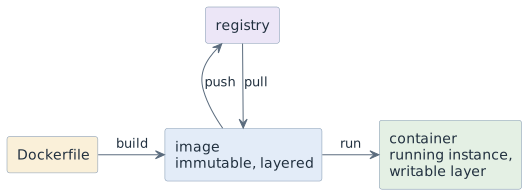
An image is an immutable, layered filesystem plus a default command. It never changes after it is built.
-
A container is one running instance of an image with a thin writable layer. Changes inside it die with it.
-
A registry is where images are stored and fetched — Docker Hub, GHCR, an internal one.
The relation is class to object, with the same consequence: many containers, one
image. Fixing something by editing files inside a running container fixes one
object, not the class — the next docker run starts from the unchanged image.
That is the feature, not the bug: an image is reproducible exactly because nothing that happens in a container flows back into it.
Points the answer must contain:
-
Image immutable and layered; container a running instance with a writable layer
-
Registry stores and distributes images
-
Many containers from one image, like objects from a class
-
Changes inside a container are lost — the fix belongs in the description
Which commands run, inspect and clean up a container?
covers: lo-3
Answer
docker run --rm -it alpine:3.24 sh
docker run -d --name web -p 8080:80 nginx:1.27
docker container ls / docker container ls -a
docker container logs web
docker container exec -it web sh
docker container stop web && docker container rm web
docker image ls / docker image rm nginx:1.27
Four flags are worth understanding rather than copying:
-
--rmdeletes the container on exit; without it stopped containers accumulate until the disk is full. -
-itgives a terminal — without it an interactive shell exits at once, which is the commonest first confusion. -
-ddetaches and returns the prompt. -
-p 8080:80publishes host 8080 to container 80. Host first; reversing it is the second commonest first confusion.
And the tag matters as much as the flags: nginx means nginx:latest, which is
whatever was pushed most recently — a moving target. Pin the version.
Points the answer must contain:
-
run, ps, logs, exec, stop, rm, images, rmi
-
--rm,-it,-dand what each does -
-p host:container, in that order -
Pin a version tag;
latestis not reproducible
Why is a container not a virtual machine?
covers: lo-4
Answer
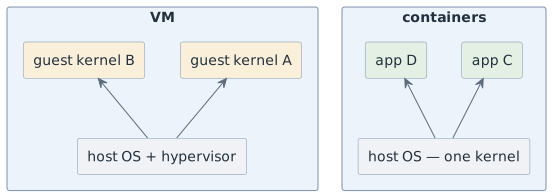
They isolate at different levels. A VM brings its own kernel; a container shares the host kernel and is isolated by kernel features — namespaces for what it sees, cgroups for what it may consume.
| VM | Container | |
|---|---|---|
start-up |
tens of seconds |
fractions of a second |
overhead |
a whole guest OS |
the process itself |
isolation |
strong, separate kernel |
weaker, shared kernel |
other OS kernel |
yes |
no |
Two consequences you meet in this course. A Linux container needs a Linux kernel, so on macOS and Windows Docker runs a small Linux VM underneath — hence the slow first start. And an image built for one processor architecture does not run on another.
The weaker isolation deserves a plain sentence: a container is a boundary, not a
sandbox for hostile code. --privileged or a mounted Docker socket hands over the
host.
Points the answer must contain:
-
VM = own kernel; container = shared host kernel, namespaces and cgroups
-
Faster start, less overhead, weaker isolation
-
No foreign kernel; macOS and Windows run a Linux VM underneath
-
Not a security boundary against untrusted code
When is a container the wrong tool?
covers: lo-5
Answer
When the cost — a description to maintain, an image to build, a layer of indirection — buys nothing.
| Worth it | Overhead |
|---|---|
it must run identically elsewhere |
a script only you run, on your machine |
it needs a service — database, broker |
a single binary with no dependencies |
the toolchain is awkward to install |
a language the IDE runs natively |
it must be reproducible in a year |
a one-off experiment you delete today |
The rule of thumb: containerise at the boundary where the software leaves your machine — pipeline, deployment, shared service. Inside your own edit-and-debug loop a container is usually friction, and ignoring that is how people end up debugging their build system instead of their program.
Saying this out loud matters because the alternative — containerising everything on principle — is a real and common failure, and it costs beginners more time than it saves them.
Points the answer must contain:
-
The cost: description, build, indirection
-
Worth it when the software leaves the machine or must be reproducible
-
Overhead for local one-offs and natively supported toolchains
-
Containerise at the boundary, not in the inner loop
Why does editing files inside a running container not fix anything?
covers: lo-2, lo-3
Answer
Because the container’s writable layer sits on top of the image and never flows back into it. The image is what gets shipped, pulled and started again, and it is unchanged.
So the edit survives exactly as long as that one container. The next
docker run — on your machine, in the pipeline, on the server — starts from the
image, and the fix is gone. Worse, it is gone silently: nothing fails, the old
behaviour simply returns, usually to somebody else.
The repair is the same rule as everywhere in this course: the fix goes into the description, the image is rebuilt, and the change is committed. Then it exists for everybody and it can be reviewed.
docker container exec -it web sh is still useful — for looking: reading a config the
image actually contains, checking a path, seeing what a process sees. Diagnosis
inside, repair in the file.
Points the answer must contain:
-
The writable layer belongs to the container, not to the image
-
The next run starts from the unchanged image; the fix disappears silently
-
Repair belongs in the Dockerfile, committed and rebuilt
-
execis for diagnosis, not for repair