Learning outcomes
-
State the problem containers solve, and give an example from your own experience
-
Distinguish image, container and registry, and say what is mutable
-
Run, inspect, stop and remove a container from the command line
-
Explain why a container is not a virtual machine, and what follows from that
-
Recognise when a container is the right tool and when it is overhead
"It works on my machine"
You have already met this problem twice without naming it. setup-tools.sh
exists so that four laptops end up with the same JDK. The site in this repository
is built by a containerised asciidoctor, because a locally installed one is a
different version on every machine — including the pipeline’s.
The general shape:
| Symptom | Underlying cause |
|---|---|
builds here, fails in the pipeline |
different tool version, different library, different locale |
works for three people, not the fourth |
something installed once, long ago, and forgotten |
worked in November, fails in March |
a system update changed a dependency nobody pinned |
"just install these six things first" |
the setup is knowledge in somebody’s head, not in the repository |
A container answers all four the same way: the environment travels with the software, and it is described in a file that is committed.
Image, container, registry
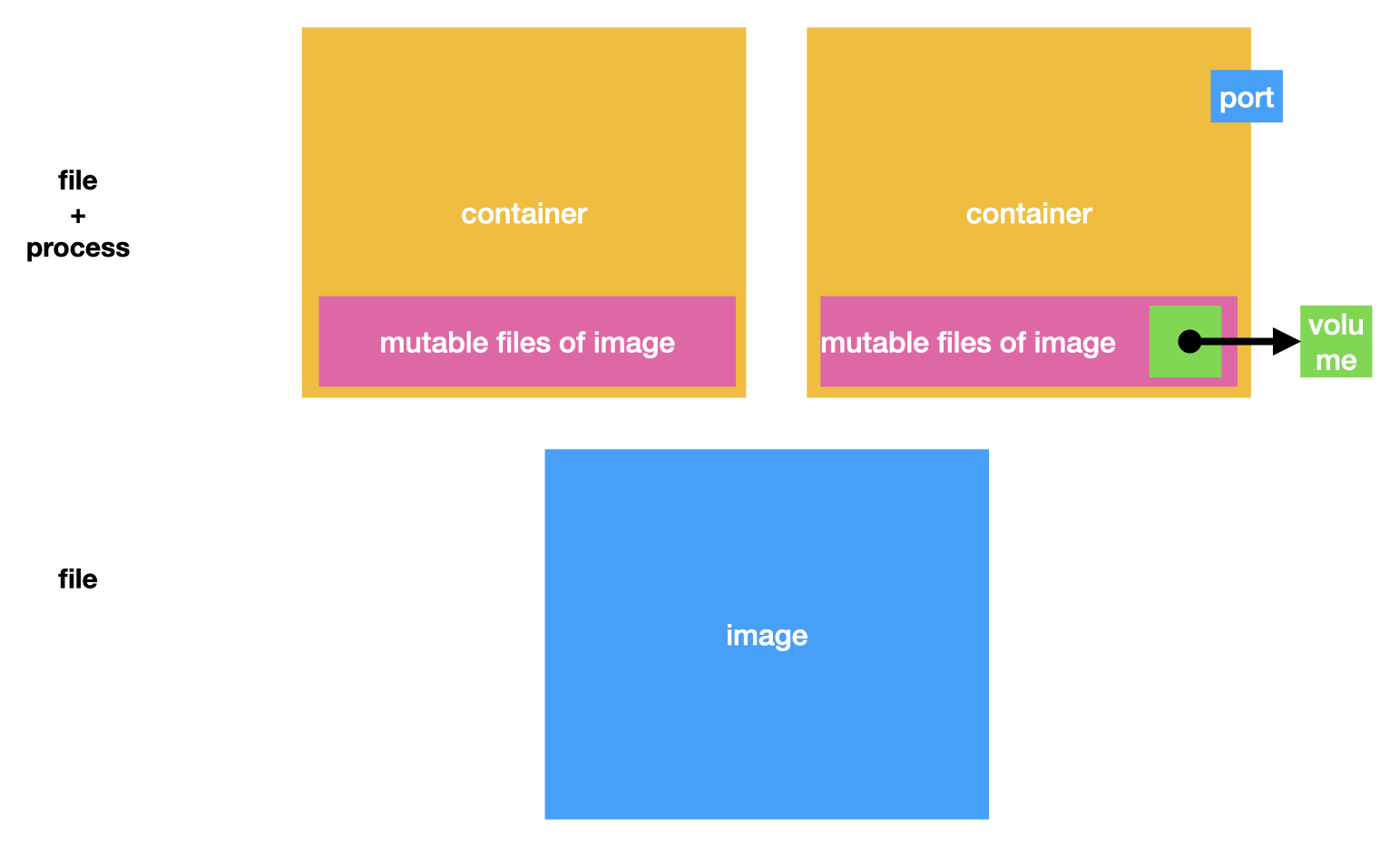
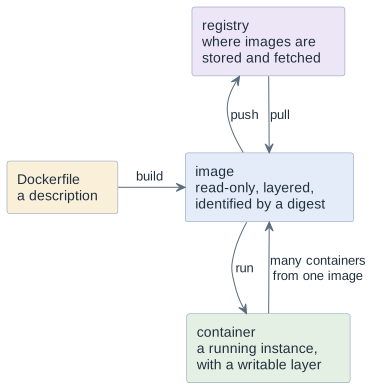
Three words, and confusing them is the source of most early errors. The picture below is the one to keep in your head: an image is a file, a container is that file plus a process, and the only part of a container that changes is a thin layer on top.
| Term | What it is |
|---|---|
image (Abbild) |
an immutable, layered filesystem plus a default command. Never changes after it is built |
container (Behälter) |
one running instance of an image, with a thin writable layer on top. Changes inside it are lost when it is removed |
registry (Ablage) |
where images live — Docker Hub, GitHub Container Registry, a school-internal one |
The relation is the one between a class and an object, and it has the same
practical consequence: many containers, one image. When you fix something by
editing files inside a running container, you have fixed one object and not the
class — the next docker run starts from the image again, unchanged.
That is not a flaw. It is the property the whole thing is built on: an image is reproducible precisely because nothing that happens in a container flows back into it.
The commands you actually need
docker run --rm -it alpine:3.24 sh     # start, attach, delete on exit
docker run -d --name web -p 8080:80 nginx:1.27   # detached, port published

docker container ls                # running containers
docker container ls -a             # including stopped ones
docker container logs web          # what it wrote to stdout/stderr
docker container exec -it web sh   # a shell inside a running container
docker container stop web          # SIGTERM, then SIGKILL after a grace period
docker container rm web            # remove the stopped container
docker image ls            # local images
docker image rm nginx:1.27    # remove an image
Four flags are worth understanding rather than copying:
-
--rmdeletes the container on exit. Without it, stopped containers accumulate silently until the disk is full. -
-itgives you a terminal. Without it an interactive shell exits immediately, which is the commonest first confusion. -
-ddetaches. The container keeps running and you get the prompt back. -
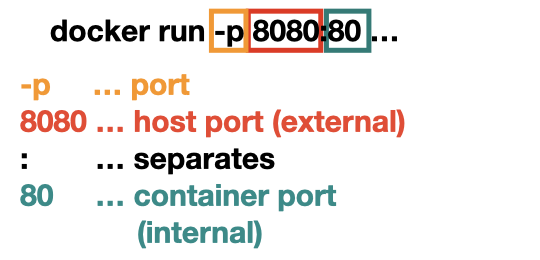
-p 8080:80does port publishing (Portweiterleitung) from host port 8080 to container port 80. The order is host first, and getting it backwards is the second commonest first confusion.
-p 8080:80 (own)The tag matters as much as the flags. nginx means nginx:latest, which is
whatever was pushed most recently — a moving target, and therefore not
reproducible. Always pin a version: nginx:1.27.
Not a virtual machine
Both isolate. They isolate at different levels, and the difference explains every practical property.
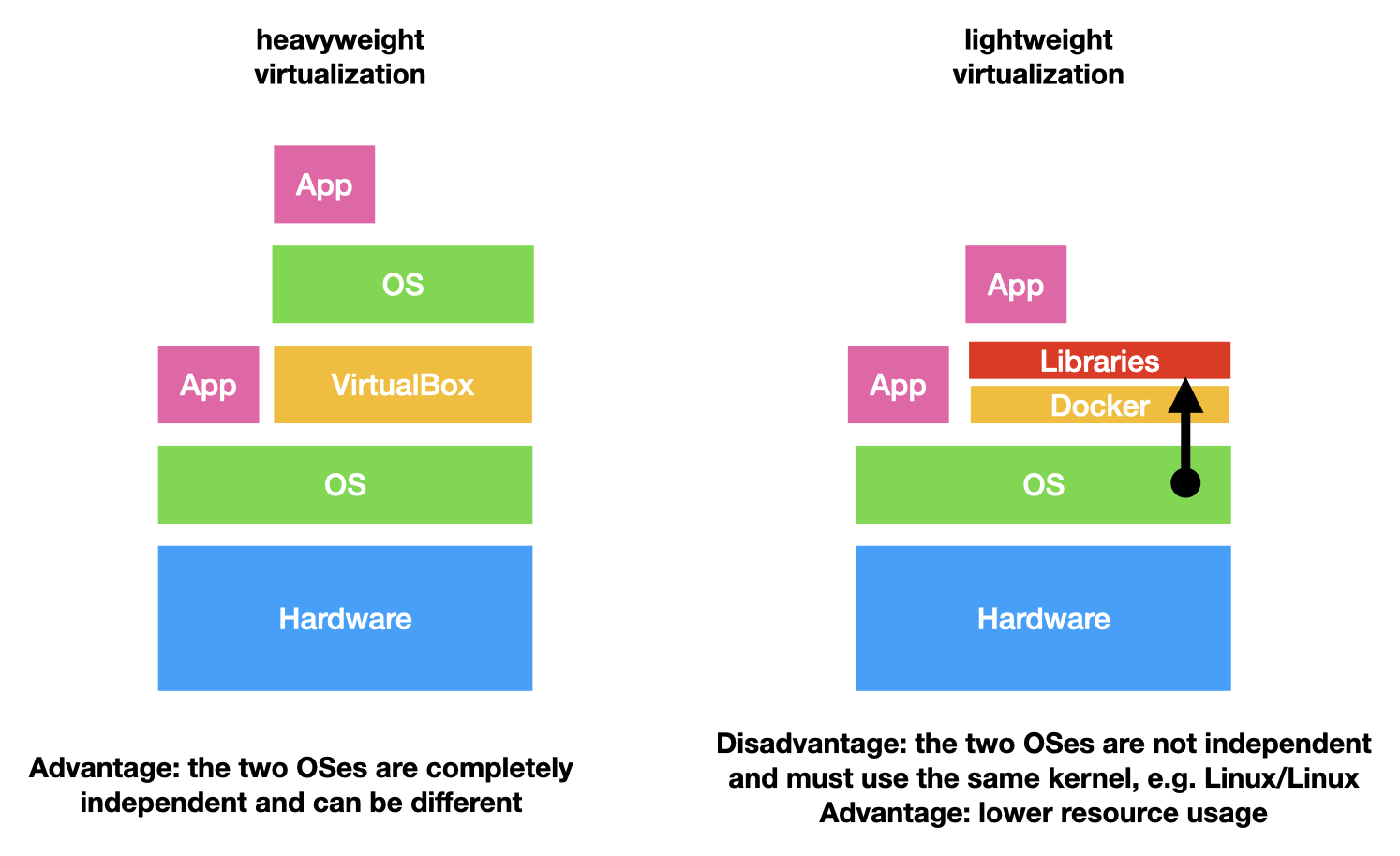
A virtual machine brings its own kernel; a container shares the host’s and is isolated by kernel features — namespaces (Namensräume) for what it can see, cgroups for what it may consume.
| Virtual machine | Container | |
|---|---|---|
Start-up |
tens of seconds |
fractions of a second |
Overhead |
a whole guest OS |
the process itself |
Isolation |
strong — separate kernel |
weaker — shared kernel |
Different OS kernel |
yes, Windows on Linux |
no |
Two consequences you will meet in this course. A Linux container does not run on
a Windows or macOS kernel — on those machines Docker quietly runs a small Linux
VM, which is why the first start is slow and why memory limits matter. And a
container image built for one processor architecture does not run on another;
that is the subject of docker-multiarch.
The weaker isolation is worth stating plainly rather than glossing: a container is
a boundary, not a sandbox for hostile code. Running an untrusted image with
--privileged or with the Docker socket mounted gives it the host.
Containers talk to each other
Containers on one host are not alone. Docker puts them into a virtual network (virtuelles Netzwerk), by default a bridge network. Every container gets its own IP address in it, and containers on the same network can reach each other without any port being published to the outside.
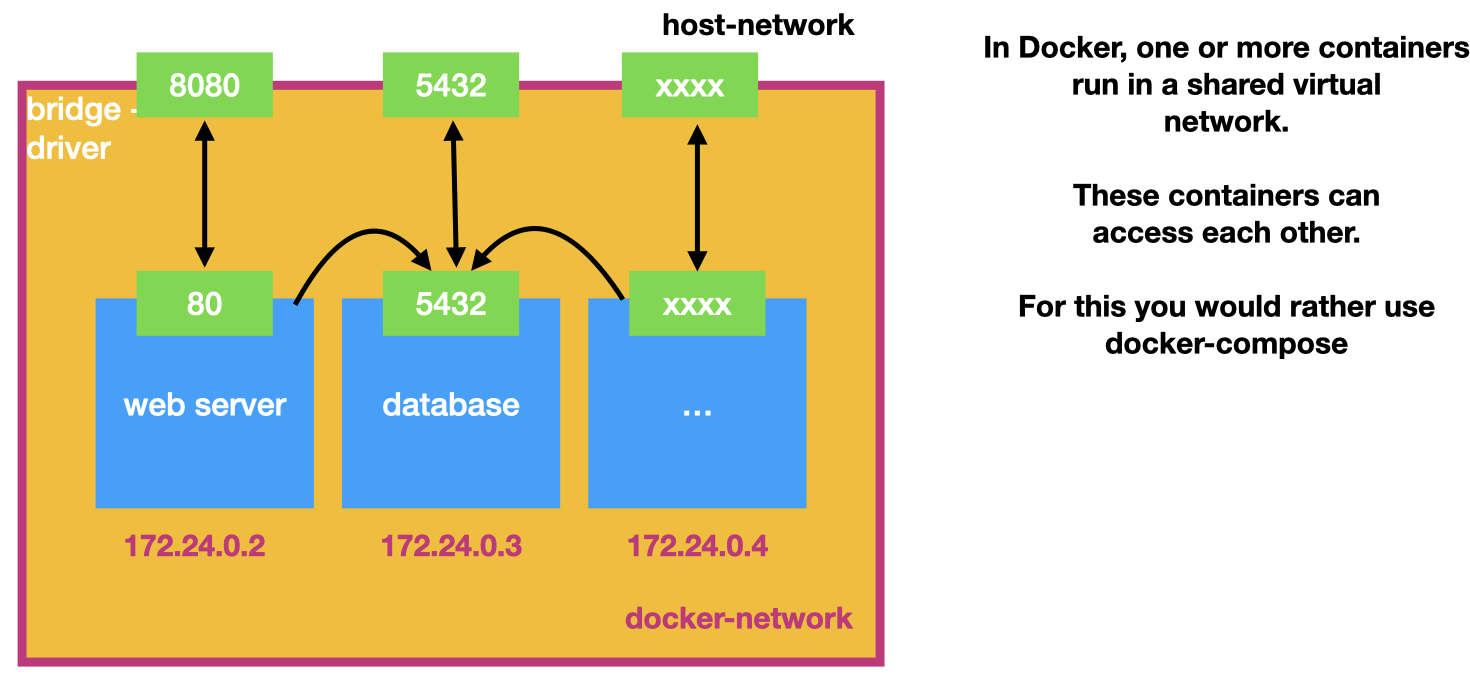
Read the picture from the inside out:
-
Inside the network the web server reaches the database on
5432directly — no-pinvolved. -
-ppublishes a port to the host network (the green boxes above the frame). Only what a person or another machine has to reach is published: the web server yes, the database usually not. -
On a network you create yourself, containers also find each other by name (
cacheinstead of an IP address like172.24.0.3). The default bridge does not do that.
docker network create booking-net
docker run -d --name cache --network booking-net redis:7-alpine
docker run -d --name web --network booking-net -p 8080:80 nginx:1.27
docker network ls
Starting and wiring several containers by hand does not scale. For that you describe the whole set in one file — Docker Compose, later in this course.
When a container is the wrong tool
The honest half of the lesson. A container costs a description to maintain, an image to build, and a layer of indirection between you and your program.
| Worth it | Overhead |
|---|---|
the thing has to run identically elsewhere |
a script only you will ever run, on your machine |
it needs a service — a database, a broker |
a single binary with no dependencies |
the toolchain is awkward to install |
a language your IDE already runs natively |
it must be reproducible in a year |
a one-off experiment you will delete today |
The rule of thumb: containerise at the boundary where the software leaves your machine — the pipeline, the deployment, the shared service. Inside your own edit and debug loop, a container is usually friction, and pretending otherwise is how people end up debugging their build system instead of their program.
Decisions
-
Every image is pinned to a version tag.
latestis not used anywhere in this course. -
Interactive experiments run with
--rm; long-lived containers are named explicitly with--name. -
Nothing is fixed by editing files inside a running container. The fix goes into the description, and the image is rebuilt.
-
No
--privilegedand no mounting of the Docker socket in student projects. -
Container images are not used for the inner edit-and-run loop unless the toolchain requires it.
Pitfalls
-
Using
latestand getting a different program next week. -
Publishing the ports backwards —
-p 80:8080when you meant-p 8080:80. -
Forgetting
-itand concluding the container "does not work" when it exited immediately. -
Editing inside a running container and losing the change on the next
run. -
Never removing stopped containers or unused images, then running out of disk in April.
-
Treating a container as a security boundary against code you do not trust.
Terminology
| English | Deutsch |
|---|---|
image |
Abbild |
container |
Behälter, laufende Instanz |
registry |
Registrierung, Ablage |
layer |
Schicht |
immutable |
unveränderlich |
namespace |
Namensraum |
port publishing |
Portweiterleitung |
digest |
Fingerabdruck des Abbilds |
Further reading
-
The Docker documentation — "Get started" and the CLI reference
-
Module
learning-environment-setup—setup-tools.shas a first draft of aDockerfile -
Module
docker-images— writing the description that produces the image