Learning outcomes
The model is the small part
The previous two lessons treated the agent as a thing you talk to. It is not. What you talk to is a harness: a program that assembles an input, calls a model, and then does something with the answer — writes a file, runs a command, calls the model again.
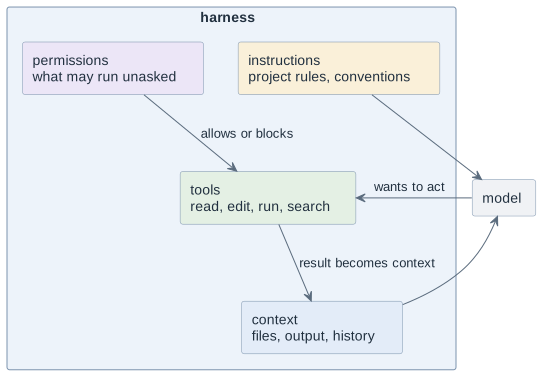
Three of those four boxes are yours. You cannot change the model; you decide everything around it. That is why two people with the same model and the same project get results of very different quality — one of them shaped the harness, the other one typed harder.
Harness engineering is the work of shaping those boxes so that the ordinary case comes out right without anybody repeating themselves.
The instruction file
Every agent tool reads a file of standing instructions from the repository —
AGENTS.md, CLAUDE.md or whatever the tool calls it. It is prepended to the
conversation, every session, whether you remember it or not.
That makes it the single highest-leverage file in the repository, and the one students consistently misuse. It is not documentation and it is not a wish list. It is the set of rules that would otherwise have to be repeated in every prompt.
| Belongs in it | Does not |
|---|---|
"Build with |
"This project is a booking system for a sports club." — that is the README |
"Tests live next to the class, named |
"Write good code." — no behaviour follows from it |
"German text uses ä ö ü ß, identifiers stay ASCII." |
A copy of the coding standard — link it instead |
"Never commit to |
Anything that changes weekly — it goes stale and nobody notices |
Two properties make an instruction useful: it is checkable — you can tell afterwards whether it was followed — and it changes an action. "Be careful with the database" fails both. "Every schema change goes into a migration file under `db/migration/`" passes both.
Keep it short. An instruction file of two hundred lines is read in full, every turn, and it competes for space with your actual question — the context problem of the previous lesson, self-inflicted.
Tools and permissions
An agent that can only produce text is safe and slow. An agent that may run any command is fast and can delete your work. The permission settings are where you choose a point between those, and the choice is yours to defend.
The useful default is a three-tier split:
| Tier | Examples |
|---|---|
allowed without asking — read-only or trivially reversible |
read a file, search the repository, |
asks first — changes something that matters |
edit a file, |
never — irreversible or reaches other people |
|
Two rules behind that table. Reversibility decides the tier: a mistake you can
undo with git restore is cheap, one that has left the machine is not. And
approval is not permanent — allowing a command once in a session is not the
same as putting it in the settings file for every future session.
| Approving everything because the prompts are annoying is a decision too, and the one that most often ends with "it deleted my branch". If the prompts annoy you, allow the read-only commands explicitly instead — that removes most of them and none of the safety. |
Reusable instructions
Some instructions are not standing rules but procedures: how this project does a release, how a new module is reviewed, what a bug report must contain. Repeating them per prompt wastes the same effort every time; putting them in the instruction file makes every session carry them whether or not they are needed.
They belong in their own files — a prompts folder, the tool’s command or skill mechanism, whatever it offers — and are invoked when the situation arises. The principle is the one from every other part of this course: write it down once, in the repository, next to the work it governs.
Whose fault is a bad result?
When the answer is wrong, the useful question is which box failed. The symptoms separate cleanly:
| Symptom | Usually |
|---|---|
It invented a method that does not exist |
model — verify, do not argue |
It used the wrong build command, the wrong folder, the wrong style |
instructions — the rule was missing or unfollowable |
It answered about a file it never opened, or contradicted the code |
context — it did not have what it needed |
It stopped and asked instead of doing the obvious thing |
permissions — it was not allowed |
It did the right thing but destroyed something else |
permissions — the tier was too generous |
Only the first line is the model’s fault, and it is the only one you cannot fix. The other four are yours, which is good news: they are repairable, and the repair holds for everybody on the team.
The harness is code
The instruction file, the permission settings and the procedure files are committed. They are reviewed in a pull request like anything else, and a change to them is a change to how the whole team works.
Three consequences worth stating:
-
An instruction that only lives on one laptop helps one person. In the repository it helps four, including the one who joins in February.
-
Secrets never go in. The instruction file is read by a model and is public in the repository; an API key in it is a published API key.
-
When an instruction turns out to be wrong, fix the file, do not work around it in prompts. A workaround repeated four times is a rule waiting to be written.
Decisions
-
Every project repository carries an instruction file, committed, under fifty lines, holding only rules that change an action.
-
Read-only commands are allowed without asking. Committing, pushing and installing dependencies always ask.
-
push --force, branch deletion and any command that sends data outside the repository are never granted standing permission. -
Procedures that repeat get their own file in the repository, not a paragraph in the instruction file.
-
No credentials, no personal data and no student data in any harness file.
-
A change to the harness goes through a pull request like a change to the code.
Pitfalls
-
An instruction file that describes the project instead of governing it. It costs context in every session and changes nothing.
-
Instructions nobody can check — "write clean code", "be careful". They read well and do nothing.
-
Letting the file grow until it crowds out the question you actually asked.
-
Approving everything once and never revisiting it. The session where that matters is the one where you were not watching.
-
Blaming the model for a missing rule. Four people repeating the same correction is a missing line in a file.
-
Keeping the harness out of version control, so the person who joins later works with a different agent than everybody else.
Terminology
| Deutsch | English |
|---|---|
Rahmenwerk um das Modell |
harness |
Projektanweisungen |
project instructions |
stehende Regel |
standing instruction |
Werkzeug |
tool |
Berechtigung, Freigabe |
permission |
umkehrbar |
reversible |
Arbeitsablauf |
procedure, workflow |
Further reading
-
The documentation of the agent tool used in class — instruction file, permissions, procedures
-
Module
ai-context-continuation— why a long instruction file costs you something -
Module
ai-agentic-loops— what the harness does with the answer it gets back